EXE
Home » Maintenance » ZHPCleaner for Windows
ZHPCleaner for Windows

ZHPCleaner for Windows

They think that a slow Windows system is sometimes mainly due to heavy programs or old hardware. But in fact, quite often, the real culprits turn out to be unconsciously downloaded browser extensions, adware, and hidden system modifications that silently change the system’s behavior. These changes usually manifest themselves in the form of annoying ads, the browser’s homepage being changed in a way that the user is not aware of, and unknown activities happening in the background. For users who cannot tell where these problems are coming from, manual detection and removal of these problems may pose a difficulty. ZHPCleaner focuses on this category of problems. It cleans unwanted software and changes computer behavior back to normal.

Targeted Removal of Adware and Browser Modifications

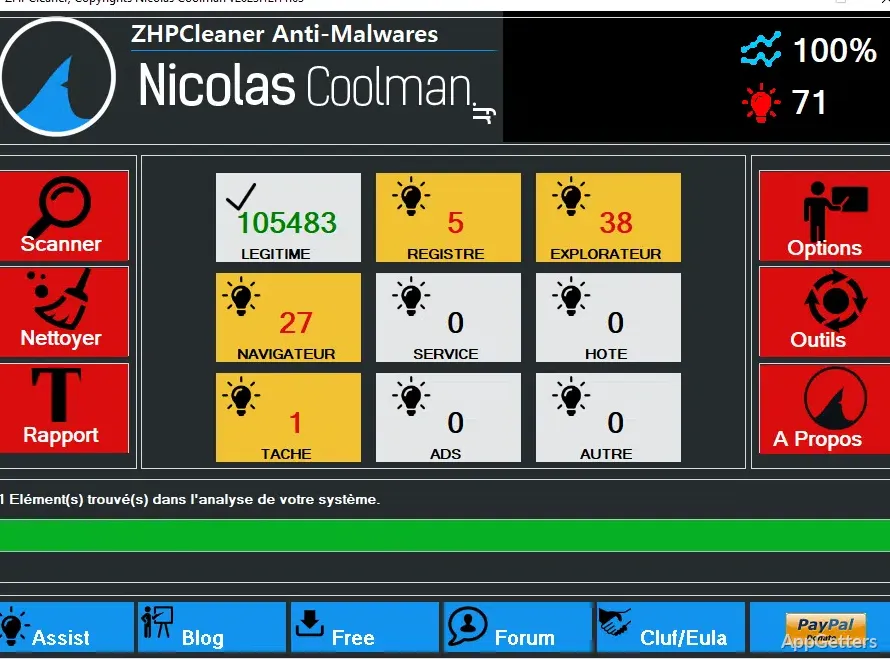
In its everyday use, ZHPCleaner will be of most help to the user in getting rid of browser-related annoyances. It looks for toolbars, extensions added to the browser forcibly, changes to the proxy, and other modifications that are very often associated with the installation of adware. In contrast to general cleanup tools, it concentrates a lot more on looking for unwanted or suspicious entries rather than optimizing the system.

The scanning is fairly fast, and the end product of the scan is a detailed report that points out the detected items. For users who have been suffering from redirects or the appearance of pop-ups, this specific approach can become effective. It can be the most effective one. It does not make unnecessary changes to the system as a whole. On the contrary, it focuses on the places where the problems most often come from. This makes it a good tool to be used for fixing problems alone rather than performing maintenance.

Ease of Use and Practical Workflow

ZHPCleaner has been made as simple as possible, which is why it is small and has a hardly noticeable interface. Users do not have to be tech-savvy, as they are simply invited to perform a scan and then clean the detected threats. Such a very simple process will not only give newbies a positive experience. It will also satisfy users who simply want to get rid of problems linked to their browsers.

As a matter of fact, the application of this tool can be considered as a one-off treatment when problems come to the surface. It is not part of the regular maintenance plan. Apart from that, it is a reduction in complexity, which is also a decrease in the chance of the user making a mistake. However, the habit of looking at the presented information before deleting should still be maintained. This helps avoid removing legitimate configurations.

Effectiveness and Practical Impact

Since ZHPCleaner has a very specific way it is supposed to work, if it is used reasonably, it can give a positive effect on system usability. This effect is immediately noticeable. The result of removing adware and unwanted browser changes is the normalization of browsing speed. Intrusions such as pop-ups disappear. Users whose redirecting problems have been ongoing will be able to see the difference almost without delay. Those who have found extensions hidden from them will notice it too.

Nevertheless, how well it works depends to a great extent on the type of problem. It is only a single security instrument, and its functions do not include those of an antivirus or an anti-malware program. If the infections are complicated or deeply integrated into the system, the use of other tools will be necessary. Therefore, considering ZHPCleaner as a highly specialized utility rather than a complete security solution is the most logical approach.

Limitations and Issues

One of the main drawbacks of ZHPCleaner is that it hardly crosses the borders set by its main task. There are no options for general system cleanup, increasing performance, or performing diagnostics related to hardware. Users who would like to have a maintenance tool for all their needs will discover its power. It handles only certain types of unwanted software.

Also, on occasion, for certain detections, the program relies on the user. The user decides whether it should be removed or not. It speaks in favor of the user. Not all novices may get it right most of the time when they determine which items can be safely deleted. Even though the tool tries to be very careful, the review process of the results will still help stop any unwanted changes.

A Focused Tool for Cleaning Browser and Adware Issues

ZHPCleaner shall be understood as an effective instrument for users who cannot stand the sight of a broken browser. It also helps with other manifestations of adware. It is very efficient in coming to the aid of home users, schoolchildren, or those who share the same computer. Unwanted extensions and redirects may appear, and the explanation is not very clear.

The way it is used practically is that about half of them have only the problem. The other half will not use it at all. So, if you have been thinking about a simple way of addressing interruptions caused by the browser, the tool may help. It can give you quite a bit of focus and dependability, minus the complexity.

Software Details of ZHPCleaner 2026.5.4.19

License
Free
Version
2026.5.4.19
File Size
3.25 MB
Downloads
0
Languages
English English, Arabic, French, Portuguese, Spanish
Category
Op. System
Windows
Developer
Last Updated
May 5, 2026

Version History

6 versions
2026.5.4.19
Latest
3.25 MB
May 5, 2026
2026.4.27.18
3.25 MB
April 29, 2026
2026.4.12.17
3.25 MB
April 13, 2026
2026.3.29.15
3.25 MB
April 7, 2026
2026
3.25 MB
March 23, 2026
2025
3.15 MB
November 3, 2025

Leave a Comment

Your email address will not be published. Required fields are marked *

Software Icon
Security Report

Loading scan data...

Scroll to Top