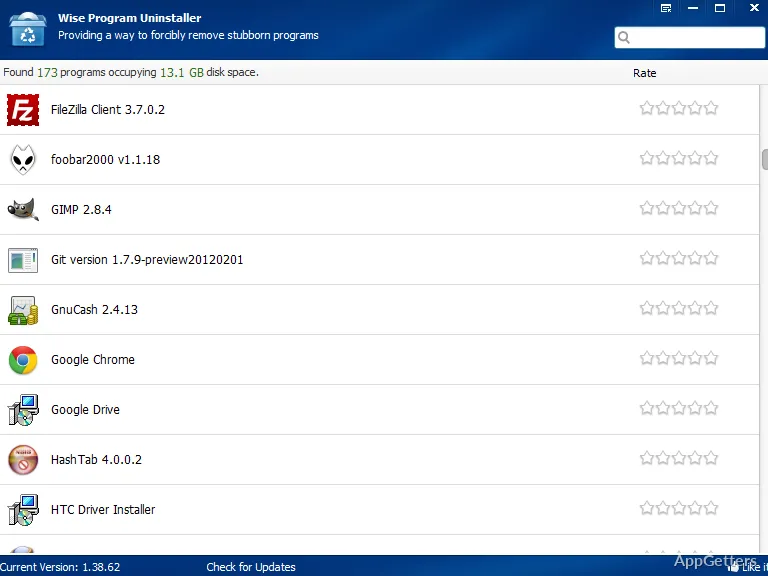
The basic Windows uninstall mechanism is generally less effective than most users think. Even when you think you have completely removed a program, there are instances where it leaves behind its folder, registry entries, startup items, or the uninstallation record is even broken. Over time, these “remnants” can accumulate on your system and cause problems. The solution to that is Wise Program Uninstaller Portable.
Wise Program Uninstaller Portable gives you a way to uninstall software with much more control over the process, unlike the default Windows uninstallation mechanism. Being portable, it does not require installation. Therefore, it can also be used for maintenance work on multiple systems. This program is user-focused and targets those who are interested in a cleaner uninstall process without having to deal with very technical repair tools.
A More Thorough and Complete Uninstall Alternative to the Default Windows Removal
The key reason to use Wise Program Uninstaller Portable is that it will give you a more complete uninstall, especially when uninstalling a very problematic or partially broken application. There are Windows settings where programs may be uninstalled forcibly, but some of them do not uninstall properly, while some others leave behind visible traces. This is where, in testing and everyday use, Wise Program Uninstallers manage these situations more reliably than the default error-prone Windows uninstallation utility.
Beginner users will probably value the simple and friendly interface. A clear display of the list of installed programs, alongside their sizes and installation dates, is available. This visually greatly improves the understanding of what software has been unused for quite a while. The forced uninstall option turns out to be a great helper when uninstalled entries are corrupted, or software doesn’t show up properly in Windows anymore.
An additional factor adding to the friendliness of the software is a lack of overwhelming technical language. Most actions are clearly labeled, and the main workflow is kept so simple. Students, home users, and older PC owners who only occasionally need cleaning assistance will be able to handle it easily.
Troubleshooting on the Go Made Possible
Other standard uninstallers lack the flexibility that the portable version offers. Being installation-free, it can be taken on a USB flash drive and launched on different computers at any time, from any place. So, if you are a repair technician, a member of the IT support staff, or a user with several household computers, this will come in handy for you.
You can save your time in real life, thanks to its portability. Besides, you won’t need a setup process, permanent system integration, and additional background services running after your use. The light-weight approach is so elegantly timed with temporary maintenance tasks or quick sessions of software cleaning.
Simple and Functional
Focusing on the mere act of uninstalling applications rather than trying to be a full system optimizer. Wise Program Uninstaller Portable keeps the look simple and easy to use. The ability to narrow down to just the task has been one of the reasons. The program continues to be an easy piece of software for Windows newcomers to use.
Most Windows systems can run the program without a hitch. Since it uses very little system resources while running, even a laptop not very new, or a low-end desktop PC will, most of the time, make you feel like operations are being done quickly. The program’s light-weight nature is a very important feature. Typically, uninstall utilities get to be used on machines that are previously cluttered and running slowly.
Some limitations, however, need to be stated. Advanced users who are used to depth-of-cleanup will be disappointed. It is perhaps not as aggressive as specialized uninstall tools targeting enterprise environments. Another group of entries, i.e., some bundled software entries, could still cause problems. This raises the level of difficulty for their removal depending on the installation method. Even so, for usual day-to-day maintenance, the program stays very reliable.
The Right Tool for Keeping Windows Systems in Top Shape at Home
Wise Program Uninstaller Portable is mainly useful to those who want a simple way to remove unwanted programs. It avoids depending completely on the Windows uninstall mechanism. Wise Program Uninstaller Portable is ideal for use at home, by students, and for shared family computers. It also suits anyone who wants to keep their Windows installation decently manageable as it ages.
The fact that it can be carried around and used by a user, without needing to be tied to the device on which it is installed, is what makes it all the more suitable. It is ideal for troubleshooting done the odd time and quick maintenance work on a variety of devices. The absence of complex optimization features is something that a lot of users will appreciate. After all, this program is to carry out one very common task well and reliably.
Wise Program Uninstaller Portable, which can be gotten for free if you go with the portable version, is absolutely a good fit for users who install and uninstall programs frequently. It is also suitable for those who test new software or perform system cleaning on Windows. Though advanced to a certain degree, the program is mainly consistent and convenient. Usually, that is just the right stuff specifiable to a typical Windows user.