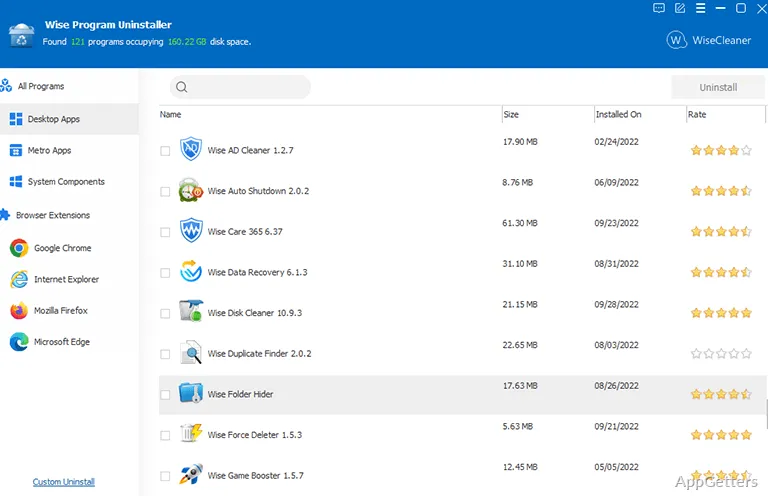
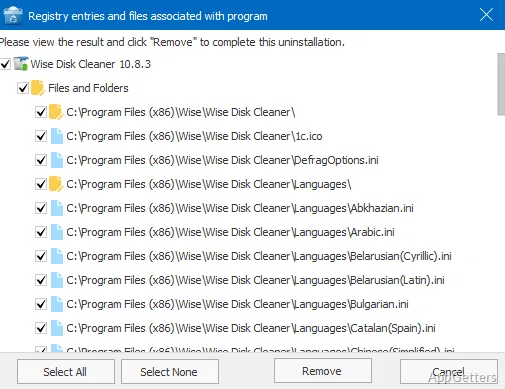
When a program’s uninstall entry is broken or the app is missing from the usual list, Wise Program Uninstaller offers other ways to remove it. It can run a standard uninstall and scan for leftovers, or use Force Uninstall and Custom Uninstall for harder cases.
Standard and forced removal
The main view lists installed programs, including Windows Store and UWP apps. Select an entry to start its normal uninstallation; afterward, Wise Program Uninstaller can hunt down the registry keys, stray files and empty folders the program left behind.
Force Uninstall is intended for cases where a program’s own removal process is missing or damaged. It searches for associated files, folders, and registry entries so they can be removed even when the normal uninstall path fails.
What if a program is missing from the list?
Custom Uninstall starts from a program’s installation folder. This gives the tool a way to find associated components for software that does not appear in Control Panel or Windows Settings.
- Use the program list for a standard uninstall followed by a leftovers scan.
- Choose Force Uninstall when the normal uninstaller is unavailable or broken.
- Point Custom Uninstall to the installation folder for an unlisted program.
Browser extensions and Software Health
Wise Program Uninstaller can remove multiple browser extensions, toolbars, plugins, and add-ons in one batch. It works with the major browsers, including Chrome, Edge and Firefox.
The Software Health area includes controls for clearing application leftovers and temporary data, including cached files, logs, and privacy traces. It also lets you manage what runs in the background or at startup, scheduled jobs and right-click menu entries, and tame pop-ups and notifications.
Shortcut-based uninstall
A context-menu option adds an uninstall command to desktop application shortcuts. Right-clicking a shortcut and choosing Wise Program Uninstaller opens the removal workflow for that app.
Pros
- Scans for leftover registry entries, files, and empty folders after removal
- Force Uninstall targets programs with broken or missing uninstallers
- Custom Uninstall can locate software through its installation folder
- Batch removal covers extensions in Chrome, Firefox, Edge, and Internet Explorer
Cons
- Browser sync may restore extensions after removal unless sync is turned off
System requirements: Windows 7, Windows 8, Windows 8.1, Windows 10, Windows 11
Can Wise Program Uninstaller remove a program with a broken uninstaller?
Yes. Force Uninstall searches for files, folders, and registry entries associated with the program.
How does Custom Uninstall find an unlisted program?
Choose the program’s installation folder; the tool searches for related files and registry entries.
Can it remove several browser extensions at once?
Yes. Batch removal supports extensions and add-ons in Chrome, Firefox, Edge, and Internet Explorer. Browser sync may restore them unless sync is turned off.