EXE
Home » Maintenance » TweakPower for Windows
TweakPower for Windows

TweakPower for Windows

Users of Windows often don’t get hit by system slowdowns all at once. Rather, they develop dos and don’ts, with gradually increasing system boot time discussions, app launching delays, and minor interruptions. These make running everyday tasks a bit heavier than they ordinarily would be. It is true that the basic Windows tools can solve some of these problems, but they usually call for manual effort or technical knowledge. Hence, this is why software like TweakPower exists, that, at a glance, looks like an all-in-one solution, intending to provide easy maintenance while not requiring the user to be too expert-level.

A pragmatic view towards system maintenance

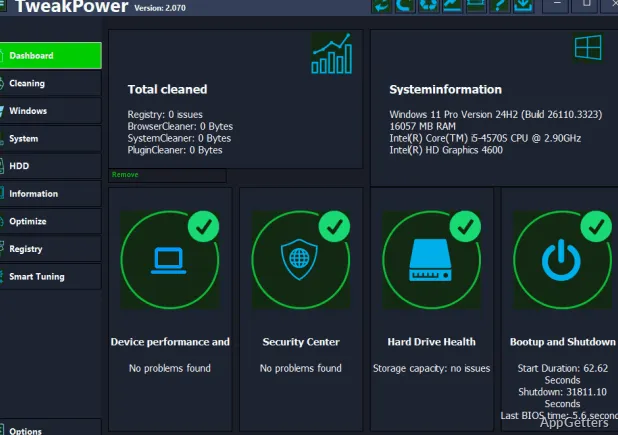
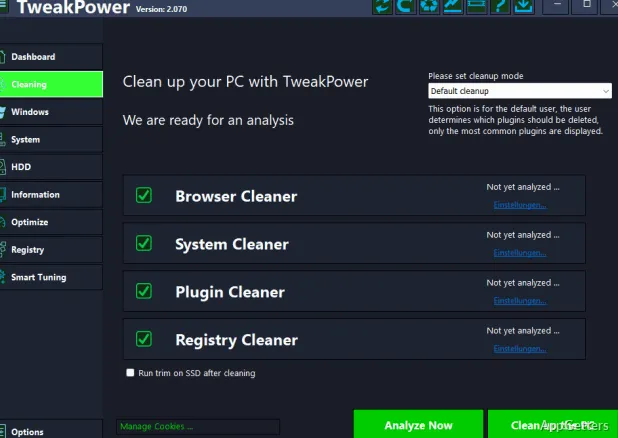
Generally speaking, TweakPower gives you an idea of what to do for routine system maintenance without a lot of technical details shoved down your throat all at once. The user interface simply organizes major activities, such as cleaning, optimizing, and monitoring, into different sections with understandable labels. For a regular home or school student, it really helps eliminate the unpleasantness of completely not knowing what to do first.

With small cleaning tasks, such as deleting temporary files and fixing broken registry entries, you barely get to interact with the program. I think it’s like a protective measure for those who don’t really understand what they’re deleting and therefore might be afraid of it. Over time, sticking to this kind of approach results in a better and better process. This applies to users who mainly use their PCs for web surfing, light work, or school, and who come to that point in their owning or using life.

Performance tweaking made easy.

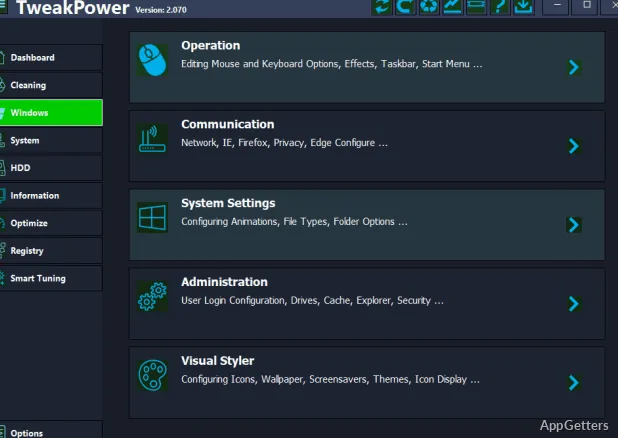
Performance-wise, there are lots of options for adjustment in the TweakPower software, with all of them introduced in a no-frills kind of way. Rather than directly showing you the very core of system parameters, it only gives you the final or nearly final version of tweaks. You are able to finalize them with just a couple of clicks. For a non-techie who just wants to see some kind of result without blindly experimenting, it will definitely be approachable.

On the spot, the improvements that you get are quite small, but, on the other hand, clear enough. Controlling the programs that run on startup can help lessen the time that the system is off during the booting stage. Running an optimization in the background may result in freeing up some system resources for those tasks currently taking place. Needless to say, the changes are not at all revolutionary on a brand new and high-end PC, but they can sometimes make an older or even a mid-range device become a little bit more responsive. Besides, a basic key benefit is that those users who may not have the time or desire to individually research each setting can still safely go ahead and do these tweaks.

Monitoring and steadiness during typical use

TweakPower is also pretty good, as it includes system monitoring features along with other features. Additionally, although it does not give detailed information like specialized software, it will still be a great help. It serves as the correct information source for everyday recognition.

Speaking of reliability, the program usually sticks to the safe side of things. Updating whatever feature you’re working on will always take you through multiple confirmation stages. The chances of the system failing due to you letting go of the mouse are quite negligible.

How it fits into a regular Windows setup

TweakPower shouldn’t be looked at as that miraculous single solution, but rather a maintenance sidekick. It is the right choice for those who don’t mind regularly going back to a clear yet efficient method. It helps in keeping their system good and running smoothly. Besides, students, casual users, and people with older PCs may be the ones who get quite a steady benefit out of it.

If you ask me, the tool might strike advanced users as a little too basic. It may feel limited in features when compared to those dedicated to them only. Nonetheless, its main plus is that it merges several vital features into one very user-friendly package. There is no doubt that it won’t be a professional tool replacement. Indeed, it connects a practical gap between the previous manual system care routine and the somewhat more heavily involved optimization workflows.

On a day-to-day basis, TweakPower is a wonderful help if you decide to integrate it into your normal operating procedures. A clean-up habit and a performance check here and there form a simple formula. Monitoring ensures one is not losing the system. Together, they enhance overall system responsiveness. This comes with hardly any user involvement or very minor ones at that.

Software Details of TweakPower 2.076

License
Free
Version
2.076
File Size
20.96 MB
Downloads
0
Languages
English English, Afrikaans, Amharic, Arabic, Armenian, Belarusian, Bulgarian, Catalan, Chinese, Croatian, Czech, Danish, Dutch, Estonian, Farsi, Finnish, French, German, Greek, Hebrew, Hindi, Hungarian, Icelandic, Indonesian, Italian, Japanese, Kazakh, Korean, Latvian, Lithuanian, Malay, Norwegian, Polish, Portuguese, Romanian, Russian, Serbian, Slovak, Slovenian, Spanish, Swahili, Swedish, Tagalog, Thai, Turkish, Ukrainian, Vietnamese, Zulu
Category
Op. System
Windows
Developer
Last Updated
November 24, 2025

Version History

5 versions
2.076
Latest
20.96 MB
November 24, 2025
2.075
20.96 MB
June 30, 2025
2.073
11.17 MB
May 12, 2025
2.072
20.96 MB
April 14, 2025
2.071
21.02 MB
March 25, 2025

Leave a Comment

Your email address will not be published. Required fields are marked *

Software Icon
Security Report

Loading scan data...

Scroll to Top