Write Python scripts, run them, and watch their execution one step at a time. Thonny combines a beginner-focused editor with a bundled Python interpreter, a visual debugger, and support for MicroPython.
How does step-by-step execution work?
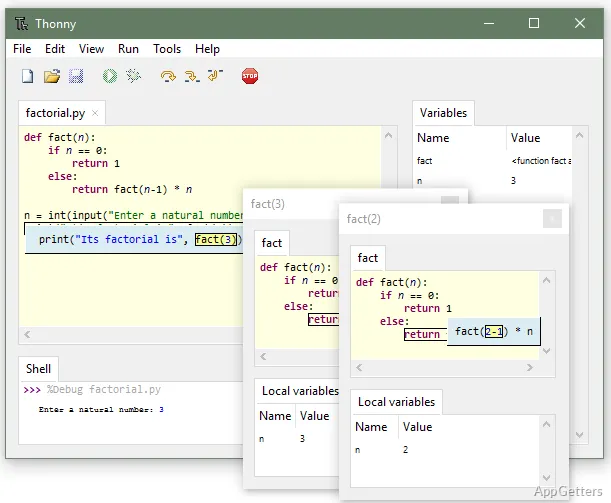
Press Ctrl+F5 to run a script under the debugger without first placing breakpoints. F6 advances by a larger step, while F7 breaks execution into smaller steps that follow the structure of the program. Small steps can show Python evaluating an expression piece by piece, making intermediate values visible as the program runs.
Stepping into a function call opens a separate view with that function's code position and local variables. This makes the flow of a call, including the separate scope of its variables, visible during execution. Thonny also highlights variable occurrences and distinguishes local variables from globals, which can bring scope mix-ups and misspelled names to attention.
Editor and variable views
The editor emphasizes the code and controls used for writing and running Python. It highlights common syntax mistakes such as an unclosed quote or parenthesis. Code completion offers suggestions as students explore Python APIs.
Choose View → Variables to inspect values created by a program or entered in the shell. Thonny presents variables in a simplified name-and-value form by default, with an option to show a more detailed representation of references. The Tools menu includes a package manager for installing third-party packages and an option to open the system shell.
Python and MicroPython workflows
Thonny includes a Python interpreter, so a separate Python installation is not needed to begin writing and running scripts. It can also work with an existing Python installation. For package tasks, the graphical manager handles third-party packages; the system shell provides access to command-line Python workflows.
MicroPython support extends Thonny to MicroPython projects. Its beginner-oriented layout and execution views also suit lessons where learners need to connect the lines in a script with the operations Python performs.
Pros
- Step through code without setting breakpoints
- Inspect expression evaluation and function-local variables
- View how commands change Python variables
- Install packages through the built-in package manager
System requirements: Windows 10, Windows 11 · ARM64 and x64
Does Thonny include Python?
Yes. Thonny comes with a Python interpreter, and it can also use an existing Python installation.
How do I step through a Python program?
Press Ctrl+F5 to start debugging. Use F6 for larger steps or F7 for smaller steps that can reveal expression evaluation.
Can Thonny work with MicroPython?
Yes. Thonny supports MicroPython projects.