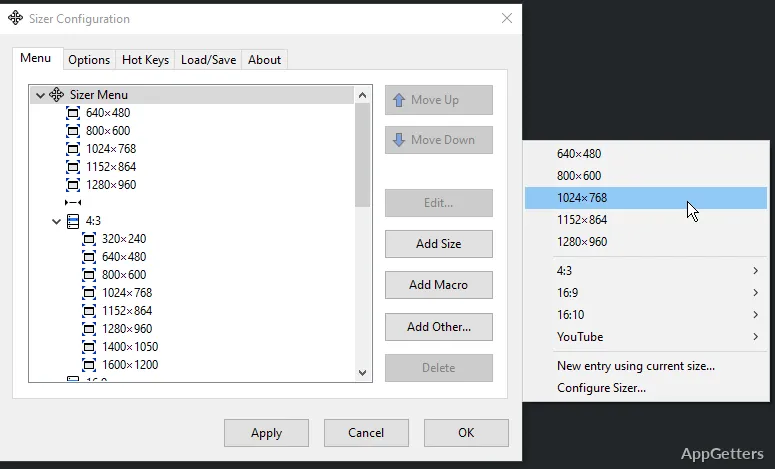
When a browser window needs to match a particular screen size for a layout check, dragging its edges can be imprecise. Sizer lets you choose saved window dimensions and positions, then apply them from a resizing menu or with a hotkey.
How do you apply a saved size?
Sizer adds a menu of resize actions for the active window. In the documented border workflow, move the pointer to a window edge or corner until a resize cursor appears, then right-click to open the menu and select an entry. A hotkey can bring up the resizing menu without locating the border; the default shortcut shown in the guide is Ctrl+Win+Z.
Custom dimensions and placement
Define entries with a name, width, and height, then choose where the window should be placed. Sizer can position a window as well as resize it, so a saved action can put its top-left corner at a chosen location. Menu groups organize entries into cascading submenus when the list needs structure.
- Use macros and expressions to calculate dimensions or positions, including values based on the current monitor.
- Macros can arrange several windows together, while wildcard matching can apply actions to matching windows.
Sizer 4 controls and settings
Assign hotkeys to Sizer actions, including opening the resize menu. Export and import configuration through the interface, or keep the program and its configuration together for portable use.
Pros
- Saved entries can set both window dimensions and position
- Hotkeys can open the resizing menu
- Macros can arrange multiple windows in one action
Cons
- Sizer 4 removed some infrequently used features from earlier releases
System requirements: Windows 10, Windows 11
Can Sizer save a window's position as well as its size?
Yes. A configured entry can set the window's dimensions and where it appears on screen.
Can one action arrange multiple windows?
Yes. Sizer 4 macros can position several windows as part of a layout.
Can I open the resize menu with a keyboard shortcut?
Yes. Hotkeys can be assigned to Sizer actions, including opening the resizing menu.