EXE
Home » Software » Windows » Maintenance » RAMMon for Windows
RAMMon for Windows

RAMMon for Windows

  • By PassMark
  • Free
  • Version: 3.3
  • 4.07 MB
  • Security Report:

Determining what kind of memory is installed inside a Windows PC is not always simple. Most users figure this out only when upgrading RAM, solving system operation issues, or checking compatibility for a new motherboard. As Windows only gives very basic hardware details, many users end up searching for third-party tools to get clearer information. RAMMon mainly targets the task of extracting and showing memory module data in a very straightforward manner. It is not intended to be a performance-enhancing tool or a benchmarking program, but rather a diagnostic and identification tool. For those who want precise RAM details without the need to open the PC case, here is a handy and lightweight tool.

Easy Method to Identify Installed Memory

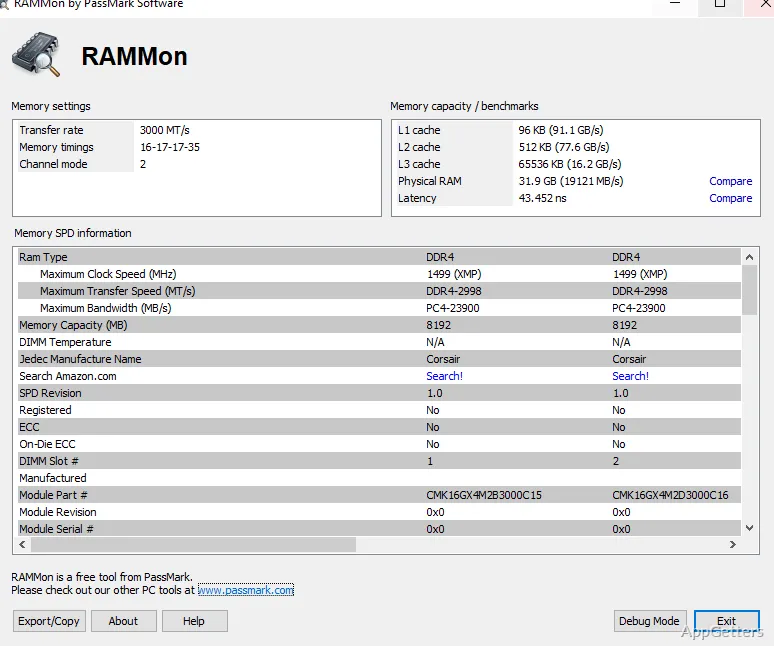
The idea behind RAMMon is simple: to be able to access and display the data stored in computer memory modules. After the program is opened, it will examine the present RAM and reveal the hardware details, such as the name of the manufacturer, module size, serial data, speed ratings, and timing specifications.

For most, this tool can take away the uncertainty aspect of memory upgrades. It provides an easy way to do it. If a person is willing to increase RAM capability in an old laptop or a desktop, they can easily verify the current module specifications. They can compare them with the ones they want to buy. This will be quite handy for computers that have no manual or have been changed by previous owners without any documentation.

It is clear that the main purpose here is to present the hardware information in a very clear way. The user interface only comprises a few elements and is purely functional. Users with advanced knowledge in hardware will most probably get the point right away. Those with limited knowledge might find it hard to comprehend certain elements.

Good Enough for Problem Solving and System Care

Every day, RAMMon works best as a check and repair tool. Sometimes PCs operate slowly, crash constantly, or have issues with hardware upgrades. At those times, memory data is important. One of the advantages of the software is the capability to verify whether memory modules are meeting their factory specifications or whether different RAM sticks are mixed.

Such openness can be a boon not only for home users taking care of their old PCs but also for small workshops repairing different systems. If they wish, they can go to the heart of the matter without physically unboxing the case.

Additionally, the program poses little threat to users because it does not bring up unnecessary features. This is evident from the fact that it opens very fast and uses very little system resources. The main focus stays on hardware reporting, rather than introducing other optimizing tools. Such a specific process makes it quite comfortable for brief diagnostic sessions.

The downside is that RAMMon is not what will fix a bad memory or put hardware through a test. Those wishing to do system-wide benchmarking or stability testing will have to look for other tools to complement it.

Compact Model and Dependable Everyday

The way in which RAMMon can be described in terms of performance is simple. It is hardly noticeable while you are working on the system normally.

Even on an older Windows system, the program will not be troublesome. Plus, it does not need a large installation or any extras to have it functioning. This quality lends itself well to portable PCs for quick repairs or occasional maintenance checks.

Apart from that, the outcome in broad terms is a level of detail that is sufficient to decide what to do with the hardware. The data is fairly well-presented so that users can visibly see memory slots and compare the modules. They can also remember the specs without having to go through a maze of tricky options.

However, it is worth noting that the utility focuses on just one thing. Those interested in extensive system monitoring might be disappointed by the limited scope here. Unlike a complete suite of diagnostics, RAMMon almost exclusively deals with memory module information, and that is by design.

If individuals only require a hardware perspective from time to time, this feature of being rather simple might be a plus. The program shuns the mess and holds the focus sharp on just one task.

Where To Use RAMMon On Windows PCs

The users who will get the most out of RAMMon are those planning to make upgrades, uncover compatibility errors, or want to have a record of their system’s hardware. Through its simple reporting, it will be beneficial to a wide range, such as students who own older laptops, home users who want to extend desktop life, and even techs who are dealing with multiple machines.

This software is distinguished by its accuracy and simplicity of use, which do not come along with attractive graphics or automation. If a person wants to discover RAM details at a glance, this tool will serve the purpose without burdening the PC and without complicated installation.

Those who perform memory upgrades or hardware maintenance regularly will find RAMMon to be a trusty tool. It helps them keep memory info within easy reach, and verification is a piece of cake.

Software Details of RAMMon 3.3

License
Free
Version
3.3
File Size
4.07 MB
Downloads
0
Language
English
Category
Op. System
Windows
Developer
Last Updated
July 23, 2024

Version History

5 versions
3.3
Latest
4.07 MB
July 23, 2024
3.2
4.05 MB
May 6, 2024
3.1 (Build 1000)
4.02 MB
February 8, 2024
3.0 (Build 1000)
4.01 MB
December 21, 2023
2.3
3.47 MB
January 23, 2023

Leave a Comment

Your email address will not be published. Required fields are marked *

Software Icon
Security Report

Loading scan data...

Scroll to Top