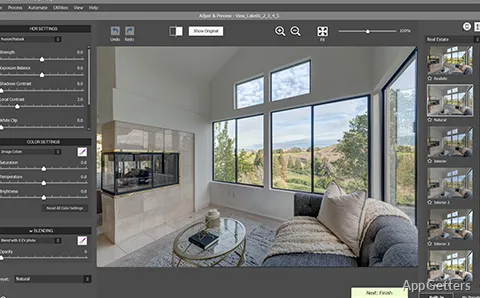
Shooting interiors with bright windows or sunsets with dark foregrounds? Photomatix Pro combines bracketed exposures into HDR photos, bringing detail from dark shadows and bright highlights into a single image. Tone-mapping controls and real estate presets shape the merged result, while ghost-removal tools address movement between frames.
Exposure merging and ghost removal
Start with a set of bracketed photos of the same scene. Photomatix Pro merges the exposures to retain information across bright and dark areas, then provides controls for handling differences between frames. Ghost removal targets objects that moved while the sequence was captured; a removal mask can be reused during processing.
The merged HDR image is the basis for further rendering and tone adjustments.
Tone mapping and presets
Tone mapping adjusts how the HDR image’s brightness range appears in the finished photo. Presets offer starting looks including Natural, Vibrant, Painterly, and Enhanced. Real estate presets are designed for interior photos, where balanced room detail and window views are important.
The HDR Inspector provides a closer look at parts of an image during editing. Photographers can use it alongside the main preview while adjusting the HDR rendering.
Batch processing and file output
Batch HDR merge processes multiple exposure sets, and previews are available during batch work. This is suited to repeatable workflows with many scenes, including property photography. Photomatix Pro can also save merged HDR images as 32-bit DNG files.
Pros
- Merges bracketed exposures into HDR images
- Includes ghost-removal tools for moving objects
- Offers real estate presets and batch processing
- Supports saving 32-bit DNG files
System requirements: Windows 10, Windows 11 · 4 GB RAM minimum; 8 GB or more recommended · 1 GB available disk space · 1,024 × 800 or greater monitor resolution · .NET Framework 2.0 or higher
What does Photomatix Pro do with bracketed photos?
It blends the exposures into one HDR picture with detail kept in the shadows and the highlights.
How does Photomatix Pro handle movement between exposures?
Ghost-removal tools address moving objects, and a ghost-removal mask can be reused during processing.
Can Photomatix Pro process multiple HDR sets in a batch?
Yes. It offers batch HDR merging with previews.