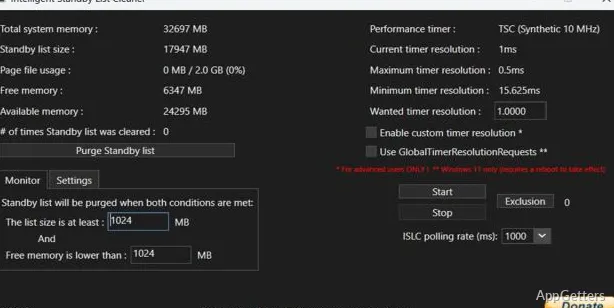
Not all performance issues on Windows are hardware-related. A weak processor or insufficient memory are not always the causes of lower performance issues on Windows systems. For instance, lots of users see and experience random system freezes, delayed system response, and changes in the frame rendering of gaming PCs. This also affects desktop computers and laptop computers fitted with the most recent hardware. These slowdowns are very often impossible to detect, as the CPU and GPU show normal levels of usage. From the user’s point of view, however, the system remains unsteady during gaming or heavy multitasking. Intelligent Standby List Cleaner ISLC, is a small program that reprograms Windows’ memory management to behave in a way that minimizes the negative impact on the user’s experience.
Intelligent Standby List Cleaner ISLC is currently very well-liked by users who dedicate a large portion of their system time to games. They are thus interested in getting one more FPS out of their systems, so that their experience is not only better but also more stable in the case of long gaming sessions. ISLC differs from other programs by creating a very small/targeted task at the system level and only focusing on performing it. It’s this particularization that, in part, makes it attractive to users who, generally speaking, have a preference for utilities performing one or a few functions rather than large, all-encompassing “PC boost” applications.
Built Around Memory Behavior Rather Than General Cleanup
Intelligent Standby List Cleaner ISLC is developed on the principle that sometimes Windows’ standby memory accumulation may be a reason for system stuttering or performance inconsistency. Unlike programs that clean junk and temporary files or that alter a lot of system settings, the software observes memory usage patterns and empties the standby list when those patterns reach certain pre-defined points.
The app normally works in the background and requires minimal user interaction following initial setup. Many set it up once and let it run in auto mode while still gaming or carrying out heavy workloads. The lightness of the program is a real strong point from the practical side. This is apart from its newness.
However, at the same time, the bar for the program’s effectiveness should not be set too high either. The program does not pretend to be the remedy for all performance issues. Uneven or unstable performance resulting from thermal throttling, faulty drivers, or insufficient hardware is a case where ISLC and, consequently, standby memory management won’t be of much help to the user. The program is designed to yield the best result in those few cases when frame-time irregularities are caused by the way memory is handled.
Most Gaming Users
Gaming is also the area where the program is most often mentioned and kept. It is the main source of demand for it, somehow. It is due to the fact that, in some situations posed by competitive games, open-world titles, and long gaming sessions, the behavior of Windows’ memory management is more visible than usual. Players who have flashes of microstutters or sudden frame drops resort to checking utilities like ISLC as one of the steps in broad troubleshooting processes.
In the case of some computers, the difference may be quite small but still considered a useful change. Frame pacing might seem to be on a more even level through extended play. This is especially true on a low-RAM system. It also applies when multiple applications are running in the background at the same time. Nevertheless, the outcome significantly differs depending on the machine, the version of Windows, and the game in question.
Also, the software’s small size is another factor that appeals to users who are less familiar with game optimizer tools. Such software is very heavy in terms of automation. There is no dashboard, no bundled features, no menus for tuning that are extensive, etc. For technically proficient users, simplicity is also a reason for trusting the tool. It is preferred over aggressive optimization suites that promise unrealistic performance gains.
Touches Upon Technical Concepts With a Simple Interface
Among the various features, most of ISLC’s controls deal with the standby list, memory monitoring, and timer resolution adjustments. Although the UI is simple to navigate, understanding the settings, however, requires some degree of technical knowledge.
This does not mean that novices cannot efficiently operate the program. The very fact that the widely recommended settings and options are commonly available makes it quite easy for beginners to get hold of the software. The tool works almost independently after setting, so minimal maintenance is necessary in most cases. Besides that, users with a high level of competence can fine-tune thresholds according to their RAM capacity and workload patterns.
ISLC in the Windows Environment
One of the scenarios in which ISLC can be used is when a user has a Windows PC. At times, they may experience stuttering or irregular frame pacing. They may also notice sluggishness related to memory usage while gaming or heavy multitasking. In fact, adjusting the system for better dependability in this way is something the enthusiast PC environment will appreciate most.
Regular or casual users with smoothly running systems may hardly notice any positive impact from the tool at all. Its benefits depend on whether the Windows standby memory behavior is a problem. In turn, this may cause other performance-related issues.
Under these circumstances, ISLC is nothing but a really light utility that attempts to boost system responsiveness. It does this while not getting in the way of, e.g., chaos caused by unnecessary or aggressive system modifications.