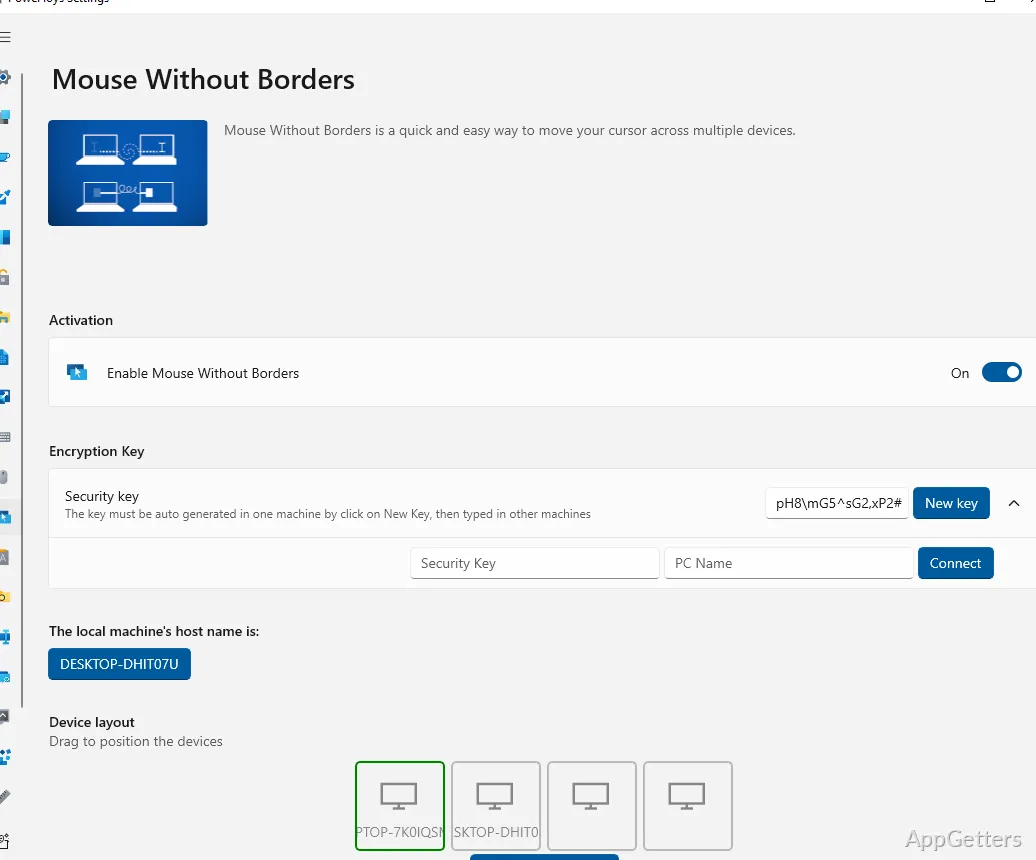
One mouse and keyboard can control up to four Windows PCs, with the pointer moving between their screens. Mouse without Borders also shares clipboard content and lets you transfer files between the connected computers.
How does one mouse reach the other PCs?
Mouse without Borders links multiple Windows computers so you can move the pointer from one machine’s screen to another. The keyboard follows the active computer, letting you type there without switching to a separate set of controls.
The program is intended for computers used in the same room. Once connected, the screens behave like neighboring work areas even though each machine keeps its own desktop and applications.
What can you share between connected computers?
Copy text on one PC and paste it on another through the shared clipboard. Files can also be moved between computers by dragging them across the screens.
- Use one keyboard to enter text on the computer currently under the pointer.
- Move files between PCs without changing to a separate keyboard-and-mouse setup.
What happens during setup?
Install and configure Mouse without Borders on each computer you want to connect. The setup process links the machines; after that, move the pointer across their screens to change which PC receives keyboard and mouse input.
Pros
- Controls up to four PCs with one mouse and keyboard
- Moves the pointer between computer screens
- Shares clipboard content and transfers files
System requirements: Windows 7, Windows 8, Windows 8.1, Windows 10 · 32-bit and 64-bit · .NET Framework 4.0 or later
How many computers can Mouse without Borders connect?
It can control up to four Windows PCs with one mouse and keyboard.
Can it transfer files between the computers?
Yes. You can drag files from one computer’s screen to another, and clipboard content can also be shared.
Does every computer need to be set up?
Yes. Configure Mouse without Borders on each PC you want to connect.