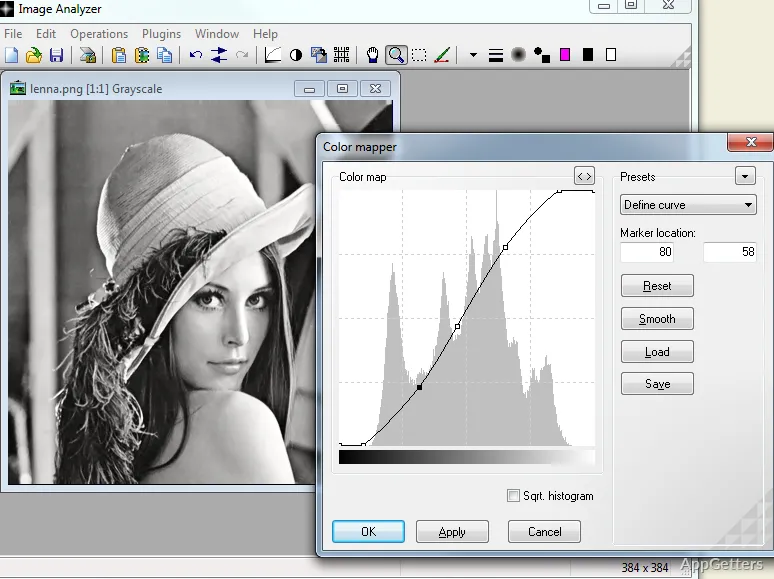
Most Windows users unknowingly pile up a lot of photos and have no clever ways of looking through, changing, and organizing their images beyond just simple viewing. Basic image viewers generally give users very little control over their pictures, whereas professional editing programs might get in the way when you only want to do a quick correction or analysis. Those who work with screenshots, scanned documents, archival photos, or research material are mostly in need of image tools that are practical instead of platforms for creative editing. Image Analyzer is a perfect sidekick for those who wish to look at, enhance, and technically modify images without changing the look of their entire desktop.
The software’s focus isn’t on artistic design. In fact, the design of the software promotes not only readability, but also technical flexibility, and ease of the users’ work with visual content. Besides students, office staff, and people who do research, even laymen can get a useful tool out of this program as a simpler and more productive option to bigger editing packages that are quite cumbersome for everyday image handling.
Everyday Image Processing in a Technical Way
Image Analyzer is more of a utility than a workspace meant for creating. The UI features mainly image operations for direct manipulation rather than visual designing motives. This at first sight might give the impression of a tool for image technicians rather than one for casual photography fans. However, after one gets used to it, the user interface turns out to be pretty easy for doing simple day-to-day work.
The real advantage of Image Analyzer is that it effortlessly supports usual image operations like resizing, sharpening, format conversion, and image cleanup. The correction enhancers may come in handy, especially for users scanning documents or digitizing film archives. They wish to get better contrasts and results without resorting to advanced image enhancement techniques.
One more advantage of the program is its very low resource usage. Unlike professional editors, this tool is not a CPU and memory hog. This way, you get a fast start. Plus, you have the chance of working without any interruptions, even when you’re doing the least computer-power-demanding task of editing. Therefore, this is a great choice for not-so-new computers or locations where being stable is more important than being fashionable.
More Than Just Looking at the Images
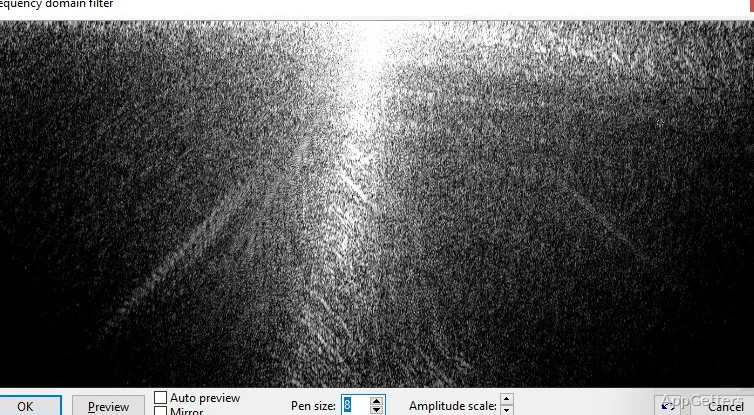
Image Analyzer is strikingly different from most photo apps, which usually come with endless visual presets and filters. Its development is based on supplying users with histogram analysis, color correction, edge detection, and other image processing features. These are not aimed at the naked eye but are aimed at experts in the field.
That is not to say these instruments are not available to non-professionals. Imagine a student who possesses a research paper only in paper form or an old family photo that has to be restored. Largely, the enhancement happens line by line, thanks to the manual work of the user, assisted by software tools. Changing brightness, contrast, and recovering details can also come in handy when preparing slides for a presentation or improving not-so-great screenshots.
Lightweight Performance With Reliable Workflow Stability
Image Analyzer might still have some bugs. These are not really noticeable most of the time. If any, they were most likely the result of the user’s incompetence rather than the software itself. The excellent program supports the most popular image file formats without any problems. In fact, it can be faultless even after a user has subjected it to frequent usage of image editing features. Hence, the heavy users of image files can save a lot of time doing their routine tasks with the help of this solid application.
The most desirable feature of this application is its compactness, which becomes quite striking once it is run on old Windows hardware. In contrast to contemporary image apps that require a huge amount of memory for execution of even simple tasks. Image Analyzer keeps system demands at a modest level.
Perfect Match For Practical And Technical Image Tasks
Image Analyzer is a perfect match for a user who may be turned off by artistic editing. It instead favors image inspection, correction, and utility-focused processing. The program will integrate seamlessly within your work environment. Especially if the majority of your images are screenshots, scanned files, archived photos, and reference images. You wish to edit them quickly without relying on large editing suites.
Anyhow, the software is targeted at non-professional users who are still passionate about images, students, office workers, researchers, and families.
It is most likely that beginners with little knowledge of image processing will get the most comfort. They can easily use this tool without needing advanced skills. They should also have very little experience with Windows. Being able to analyze images, the program is a lot more than an ordinary image viewer. But it is thought to be very efficient in its category of applications.
Usually, professional editing software boasts a beautiful interface. On the other hand, creative freedom is significantly sacrificed by this program. Still, Image Analyzer is a well-focused tool. It serves you thoroughly with image processing and analysis. It also helps make the changes you need regularly.