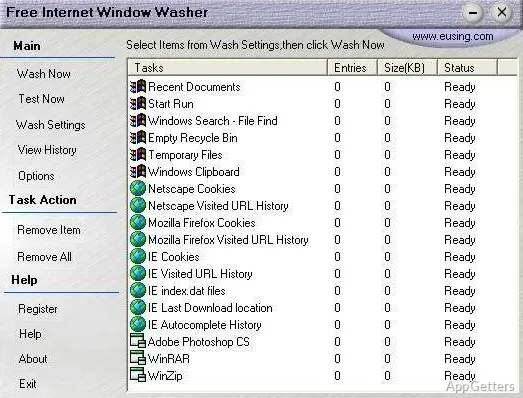
Like any other computer, even a Windows system that is well maintained will, in time, gather remnants of daily activities. Temporary files, cached data, web browser histories, and other non-used app files will quietly accumulate over time. Generally, such a build-up won’t cause the system to malfunction at once. However, they can affect security, the speed of the computer, and the overall experience. Most of the time, people only see the problem when they find out that their disk space is very low or that their browsers are not working as expected. What these cleanup tools do is remove the accumulation slowly over time. Free Internet Window Washer, a tool among such programs, is still positioned as a very small and light program. It is oriented more to privacy and cleanup.
Concentrated Cleaning of Daily Internet Activities
When you open the program, you will see that the main thing Free Internet Window Washer does is delete all internet surfing and browsing stuff and other common system footprints. It looks for files that save past user activities, cookies, stored content, and also all other leftover data that the internet might create during use. The program doesn’t go all out visually. It simply presents the list of things to clean for the user, and thus does not scare him with so many technical things. Most of the time, this great approach is workable for students, home users, or any other person who only desires a quick cleaning. It is without any complicated steps.
This procedure of cleansing is quick for the most part, especially for machines with average usage of storage. It doesn’t try to do more than what was planned, and that always helps in avoiding getting lost. Having said that, those people who look for running a deep registry cleaning or for advanced repairing tools may be a bit underwhelmed by what it turns out to be here.
Privacy-First Coding
One of the main features of this program is the stress on privacy protection. By erasing the web-browsing tracks and usage logs, it can greatly diminish the quantity of personal information one can still retrieve after closing the computer. This will especially be beneficial for shared computers or multi-user environments.
While giving this program a try, we have observed that it does the cleaning in a very stable manner. It does not cause any unexpected results or deletions beyond the intended ones. It does a good job at not deleting essential files, which makes it a fairly dependable tool for even the least computer-savvy users. However, it also does not offer super detailed reports or the possibility of controlling each piece of data to be removed. Skilled users who want higher levels of control may consider this method quite limiting.
Performance Effectiveness with Minimal System Usage
A very nice thing about Free Internet Window Washer is that its operation requires very little of the system’s processing power. It doesn’t slow the computer down or cause it to lag in any way while it is being used. It does the scanning quickly enough without using up lots of the computer’s resources. Therefore, it can also be used on a very old Windows computer. It can also be used on one whose hardware capacity is quite limited.
Installing it is very easy, and the program itself launches just as fast. There are no heavy background running services or constantly active processes remaining after the cleaning has been done. On the other hand, one must also bear in mind that Free Internet Window Washer is a light product. It has no advanced features. It does not include automation, scheduled cleaning, or even monitoring in the background. So, if you want to use it regularly, you will have to operate it manually every time.
In the Context of a Typical Windows Environment
Only if one really needs a fundamental maintenance tool that is simple and yet has a definite privacy focus, Free Internet Window Washer will do the job quite well. It has no other bells and whistles and works with limited fuss. It is continuing to be very helpful when used with other programs as a supporting actor. Free Internet Window Washer works best rather than trying to be the leading one in particular setups. In such setups, users are already operating the Windows built-in tools or other separate optimization software locally.
For the guys who use the computer very occasionally, students, or those who work with shared systems, Free Internet Window Washer is a very good choice for cleaning browser histories. It is also useful for just periodically clearing the space. However, the ones who are more advanced will start looking at this product as a second-tier tool. It is not a primary solution. Its advantage is in its very focused approach. It gives the app a trustworthy and easy-to-handle character. At the same time, it does not try to be everything to everyone in terms of system maintenance.
What does Free Internet Window Washer remove?
It removes internet tracks such as browsing history and cookies, along with computer activity records, program histories, and junk files.
How do you start a cleanup?
The program erases its targeted traces and records with a click.