EXE
Home » Maintenance » Czkawka for Windows
Czkawka for Windows

Czkawka for Windows

  • By qarmin
  • Free
  • Version: 11.0.1
  • 57.42 MB
  • Security Report:

Over time, as storage runs out, many Windows users find it hard to figure out the real causes of storage usage. Duplicate files, empty folders, and remaining data of previously removed programs silently build up in the background. Default utilities hardly go beyond the basics of cleaning, so users have to hunt down unwanted files manually. Czkawka targets this issue by concentrating on detection rather than automation. It seems to be a very quick and simple tool that accurately detects duplicate and unnecessary data. It is intended for people who want understanding and control instead of just a cleaning button.

Targeted Scanning With Open Results

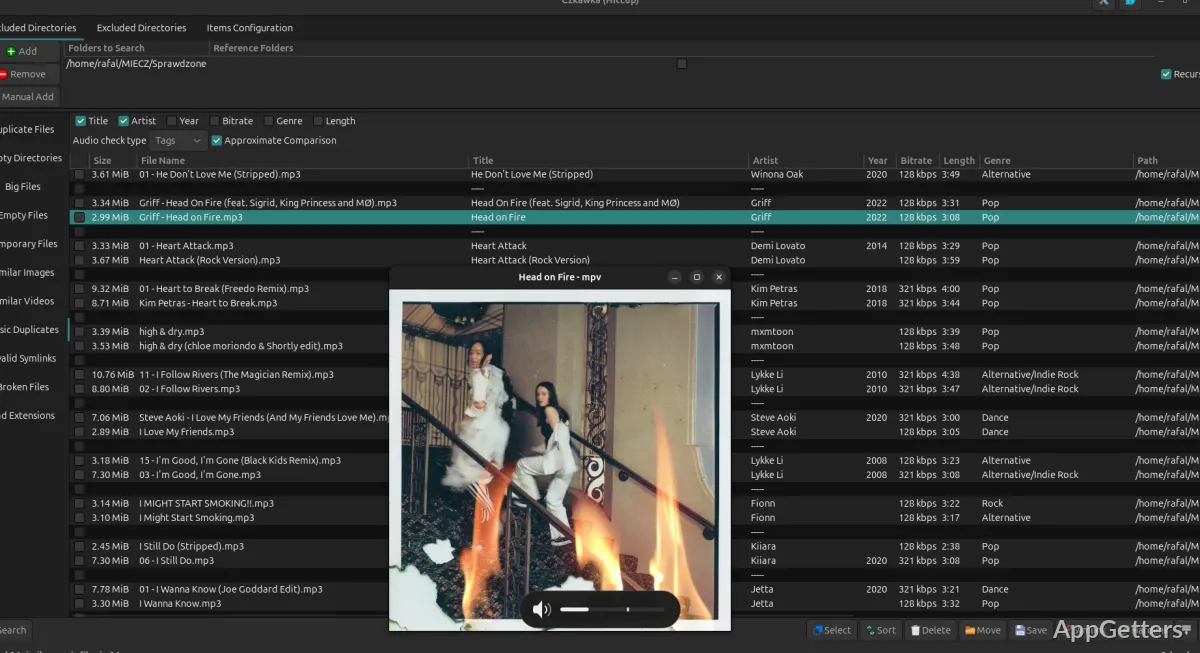
Interacting with Czkawka resembles the experience of using a diagnostic tool more than using a cleaner. After picking the folders, the program looks for duplicates, empty folders, and related files in the whole system. It then shows the results in an orderly manner so that one can check the figures before proceeding. Such a strategy lessens the possibility of deletion errors, which is a very prominent worry for users of automatic tools.

For people with limited storage, like students or home users organizing their drives, this level of openness is really important. Besides, the scanning pace is quite admirable, even though the tool is working on big sets of files. On the other hand, the design might look technically complicated to newbies, especially when they have to deal with things like similar pictures or different types of file hashes.

Usefulness and Capability

One of the main things Czkawka is praised for is its very good performance. It deals very well with large amounts of data, which makes it a good fit for users who happen to have large libraries of files. It is capable of scanning different kinds of items, such as documents, media files, or combined content, but always operates at high speed and does not exhaust the system in terms of resources.

Besides that, the freedom offered to the user is another point in favor of the program. One can make a choice of what to delete without being forced to abide by cleaning presets. This is excellent for those interested in keeping important files intact. Also, you can check the duplicate files before deleting them, so you get to be really sure that you want to get rid of them.

This is the sort of application that, when not actively used, does not bother running background operations. It does not make other system changes. Besides, it can be launched from time to time without any kind of effect on the normal operation of the computer, which is exactly the way manual supporters like to do things.

Not to be Ignored, These Flaws

An expert-level program, Czkawka is probably unsuitable for absolute beginners in all cases. The interface, although it does its job, does not have a tutorial or walkthrough to help new users find their way amongst the cleaning options. They will probably have to get used to how different scans operate before being able to interpret the results correctly. This is basically by trial and error.

Features that help the whole process in terms of time-saving are missing completely here because no automatic cleaning options are built in. The safety aspect is really emphasized here, as every action needs user permission; however, at the same time, it is done at the cost of convenience. What is more, major functions like finding similar images have to be carried out with great caution. Any wrong move leads to deletions that one does not intend to make.

The combination with system-wide cleanup is really minimal. This is besides the analysis of files. If you have come with your mind set on a full-fledged optimization program, then its capabilities will seem too limited for you.

File Management Tool That Puts You in Command

It is only logical that the tool is geared towards those people who like to personally intervene in storage management. Czkawka is indeed a good match, especially for students, home users, and anyone else who has been jamming up his/her system with duplicates of files over quite a long period of time without even realizing it.

What it really offers is the capability to swiftly engage with a system file inventory. It clearly spells out what files are occupying storage, and by the same token, equips users with the means to handle them responsibly. Among other things, it lacks a single-click cleaning feature. At the same time, it is capable of a level of control that quite a few users will find desirable.

When used regularly, Czkawka comes in handy as an occasional cleaning assistant. It certainly shines when a storage problem surfaces and a thorough examination becomes necessary. If you do not mind spending extra time verifying results, it will present a reliable option. It helps make room without being subject to risk.

Software Details of Czkawka 11.0.1

License
Free
Version
11.0.1
File Size
57.42 MB
Downloads
0
Languages
English English, Afrikaans, Amharic, Arabic, Armenian, Belarusian, Bulgarian, Catalan, Chinese, Croatian, Czech, Danish, Dutch, Estonian, Farsi, Finnish, French, German, Greek, Hebrew, Hindi, Hungarian, Icelandic, Indonesian, Italian, Japanese, Kazakh, Korean, Latvian, Lithuanian, Malay, Norwegian, Polish, Portuguese, Romanian, Russian, Serbian, Slovak, Slovenian, Spanish, Swahili, Swedish, Tagalog, Thai, Turkish, Ukrainian, Vietnamese, Zulu
Category
Op. System
Windows
Developer
Last Updated
February 27, 2026

Version History

4 versions
11.0.1
Latest
57.42 MB
February 27, 2026
10.0.0
35.55 MB
August 19, 2025
9.0.0
33.25 MB
March 17, 2025
8.0.0
27.83 MB
February 14, 2025

Leave a Comment

Your email address will not be published. Required fields are marked *

Software Icon
Security Report

Loading scan data...

Scroll to Top