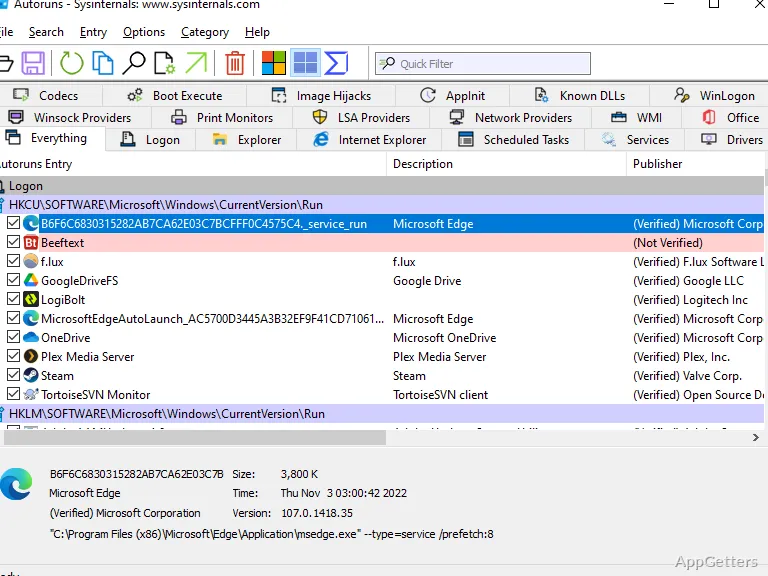
The Logon category shows programs configured to start when a user signs in, alongside other automatic startup entries. Autoruns Portable brings the Sysinternals inspection tool in a package that runs from a removable drive or local folder without a conventional installation.
Browse startup entries by category
Autoruns scans many places Windows uses to launch software, including logon entries, scheduled tasks, services, drivers, and Explorer extensions. Separate tabs organize these kinds of entries, while the main list shows where each item is configured and the order Windows processes it.
Select an entry to view its properties or jump to its Registry or file-system location. The options to display only non-Windows entries and hide signed Microsoft entries narrow the list when investigating software added by other vendors. Autoruns can also show startup items belonging to different user accounts on the same PC.
Disable an entry or inspect its file
Clear an entry’s checkbox to disable that automatic launch; use the delete command to remove its startup configuration. The program also offers digital-signature verification. These controls let administrators examine a startup item and its associated file or configuration before deciding whether to change it.
- Use the search and display filters to narrow a long list.
- Open an entry’s properties or navigate directly to its configuration location.
- Enable VirusTotal checks to query file hashes; submission of files is an available scan option.
Run Autorunsc for command-line output
The included Autorunsc command-line utility reports the same kinds of automatic startup locations for scripts or administrative workflows. Its CSV output can be saved for review in spreadsheet software, and options can filter categories or hide Microsoft entries. Autorunsc also supports signature checks and XML or tab-delimited output.
Carry the utility between PCs
The portable package can run from local storage or removable media without a standard installation. This suits troubleshooting workflows where the same startup inventory tool needs to be available on more than one computer.
Pros
- Groups startup entries into tabs for different categories
- Can hide signed Microsoft entries to focus on third-party items
- Includes Autorunsc for command-line reports in CSV format
System requirements: Windows 7, Windows 8, Windows 10, Windows 11
What does Autoruns Portable show?
It displays programs and components configured to start automatically, including logon items, services, drivers, scheduled tasks, and Explorer add-ons.
How do I stop an item from starting automatically?
Clear the checkbox beside the entry to disable it. The delete command removes its startup configuration.
Can Autoruns Portable create a report?
Yes. The included Autorunsc command-line utility can produce CSV, tab-delimited, or XML output.