EXE
Home » Maintenance » ASIO4ALL for Windows
ASIO4ALL for Windows

ASIO4ALL for Windows

  • By ASIO4ALL
  • Free
  • Version: 2.19
  • 417.66 KB
  • Security Report:

When it comes to Windows, one of the biggest annoyances for music producers, recording engineers, and other audio professionals is audio latency, that is, the delay between your action, e.g., singing, and the corresponding sound through the speakers. Standard drivers usually cause such a delay that it becomes a real problem when you want to monitor vocals or play a virtual instrument. Professional audio interfaces normally have their own ASIO drivers, but most of the built-in sound cards don’t. That’s why people have been looking for a solution. ASIO4ALL is one of the most popular free software tools that effectively helps with lowering latency and increasing the audio responsiveness without having to invest in specialized and rather expensive hardware.

How ASIO4ALL Helps Bring Basic Audio Devices to Low-Latency Performance

Essentially, ASIO4ALL places a layer between your standard Windows audio driver and the audio program, thus making the operating system think that you have an ASIO driver. This, in plain language, means that you can get lower latency, even if you have only the basic sound card that came with your computer.

For those who don’t have professional audio interfaces, it really can be worth the change. You’ll find it much easier to engage in situations where device responsiveness matters, like playing your MIDI keyboard, recording and listening to your live input, or mixing your tracks. We are not talking about getting studio-level performance equivalent to the high-end gear, but the difference is there, and for most purposes is quite sufficient to keep you going, which explains why ASIO4ALL is so popular among students, people doing music as a hobby, and home studios where budget is definitely the issue.

Getting Started and the Day-to-Day Use

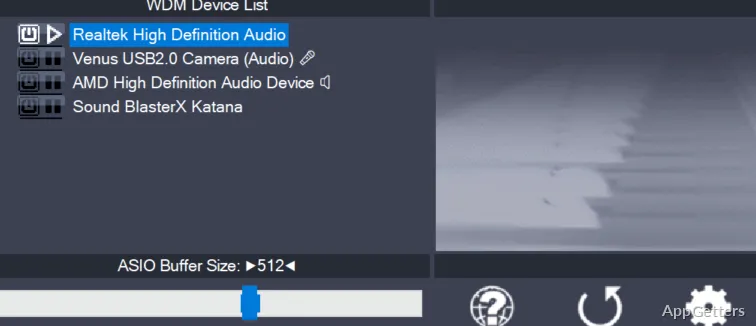
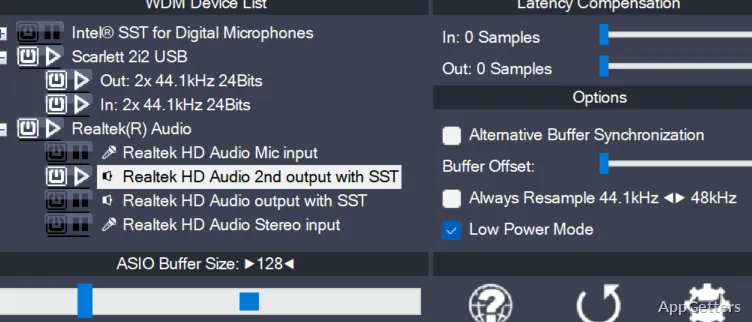
Downloading and installing ASIO4ALL is pretty simple, but if you really want your system to perform at its best, you’ll have to do some tweaking. What people usually do is play with buffer size and choose the right input and output devices, both on ASIO4ALL settings and on the software they’re using for music making.

If you’re new to this whole thing, then you may find these steps a bit geeky, but that’s the only way around, really. Once it has been set up, generally that’s it; it runs fine day after day. Most people who mess with buffer size end up with lower delay. Quite often it causes sound to break up, so they have to compromise somewhere in the middle.

ASIO4ALL: Upsides and Downsides

In the main, people use ASIO4ALL to get better response times. They do this without ditching the standard Windows audio drivers altogether. If you want to do some recording, make podcasts, or work on music production projects, it will be a very decent performing solution. It performs better compared to the default drivers.

On the contrary, it is also very important that you comprehend its strengths and limitations as such. It mainly uses your old Windows driver in the background. The overall performance depends on your underlying hardware and system setup. It will not replace actual hardware-based ASIO drivers that are standard with professional audio interfaces. Only in very few cases of very heavy workload or very complex projects, you may get drop-outs or system crashes.

ASIO4ALL Benefits and Problems for Different Users

Some of the reasons why users prefer ASIO4ALL are ease of access, small system footprints, and low resource usage. It comes free of charge, is very lightweight, and supports Windows versions going way back. If you’re willing to give audio production a try and, at the same time, not waste money on hardware, then it’s a reasonable door into the world of sounds. Otherwise, if you really want to get the most out of your ASIO4ALL, you will have to learn some basics.

Who Should Use ASIO4ALL, Especially inside Educational and Home Studio Settings

ASIO4ALL is a perfect match for beginners or those working on internal or low-level audio hardware. It helps achieve better latency performance when creating music or other types of art. Besides cutting down the processing times in creative work, it is useful for home studios and student assignments. It also helps with occasional music making without a separate audio interface.

For the sake of argument, it is useful to consider ASIO4ALL as the beginning of the journey. Starting from that point, the user reaps several benefits of enhanced performance. While experiencing singing and playing of musical instruments, everything runs quite smoothly. They can even get a taste of the good things that advanced hardware can offer. After a while, it will be recognized as a trusty companion in a minimum setup. It allows one to work in audio to a large extent without incurring complexity or cost.

Software Details of ASIO4ALL 2.19

License
Free
Version
2.19
File Size
417.66 KB
Downloads
0
Languages
English English, Afrikaans, Amharic, Arabic, Armenian, Belarusian, Bulgarian, Catalan, Chinese, Croatian, Czech, Danish, Dutch, Estonian, Farsi, Finnish, French, German, Greek, Hebrew, Hindi, Hungarian, Icelandic, Indonesian, Italian, Japanese, Kazakh, Korean, Latvian, Lithuanian, Malay, Norwegian, Polish, Portuguese, Romanian, Russian, Serbian, Slovak, Slovenian, Spanish, Swahili, Swedish, Tagalog, Thai, Turkish, Ukrainian, Vietnamese, Zulu
Category
Op. System
Windows
Developer
Last Updated
April 20, 2026

Version History

5 versions
2.19
Latest
417.66 KB
April 20, 2026
2.18
417.42 KB
April 1, 2026
2.17
416.35 KB
March 9, 2026
2.16
381.76 KB
July 18, 2024
2.15
310.11 KB
June 5, 2024

Leave a Comment

Your email address will not be published. Required fields are marked *

Software Icon
Security Report

Loading scan data...

Scroll to Top