EXE
Home » Software » Windows » Maintenance » AOMEI PXE Boot for Windows
AOMEI PXE Boot for Windows

AOMEI PXE Boot for Windows

  • By AOMEI
  • Free
  • Version: 8.1.0.0
  • 187.81 MB
  • Security Report:

Connecting several computers together is a task involving a lot of repetition in a short time. The installation of the operating system on each computer, managing the bootable USBs, and constantly checking the configuration of each computer take up a lot of time. They need coordination. This method will definitely seem very ineffective to groups of a few people, classrooms, and home setups with a number of devices. AOMEI PXE Boot is in the market to solve that issue. This product helps these systems to boot through a network. Thus, there is no need for any physical installation media.

Working Out Network Booting is No Longer Difficult

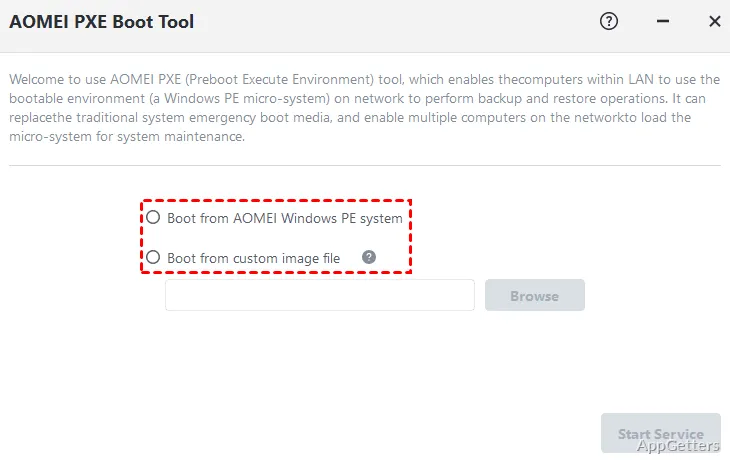
Initially, there were no tools like AOMEI PXE Boot to provide a simplified version of a rather complicated concept. Very few people are aware of it in practical situations. PXE booting is a combination of manual configuration of servers, setting up DHCP, and boot images. This product makes everything appear simple. It gives the user an interface with instructions for setting up a boot server in a few steps.

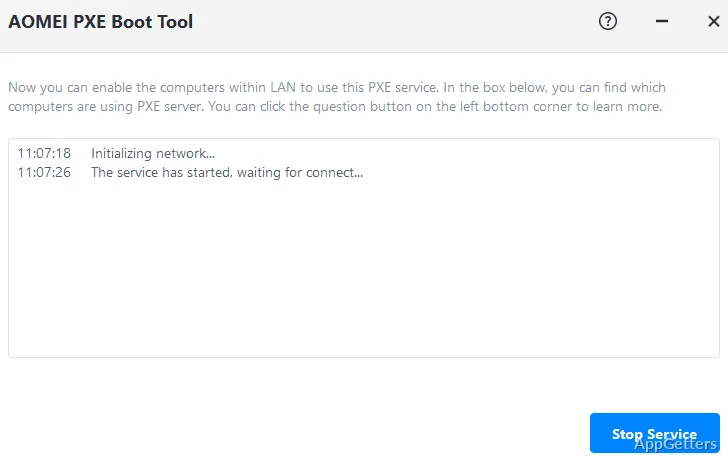
After the process has been completed on a Windows machine, other computers on the same network will be able to boot straight from a shared image or environment. For starters, this makes network booting a less exclusive and specialized IT task. It becomes more of a normal setup process that can be managed without calling in an expert.

On the other hand, a bit of knowledge about the basics of the network is still necessary. If the networks are set up incorrectly, it can lead to problems. The devices may not be able to connect. This could require intervention and fixing.

Implementation in Actual Interactions with Multiple Computers

The value of AOMEI PXE Boot will be very well appreciated as a real-time tool for performing collective tasks. This applies in environments such as classrooms or small offices. It is important to have all the computers working in the same way at the same time. This is done without the necessity of using USB drives on every single computer. Such a situation will be a major point when it comes to system installation, maintenance, or diagnostics.

Deploying a uniform setup simultaneously on many devices will be greatly enhanced with this feature. In place of doing the same thing over and over again on each individual machine, the users are presented with a chance to initiate a network boot. They can get on with the setups at one time. This can greatly decrease the amount of time needed for routine deployment tasks.

In the case of home users, the advantages will be topical rather than real. Managing multiple computers will be a scenario when it will come in handy. However, the usual way will be more relevant to single-device scenarios.

Reliability and Processing Level of the Product When Actually in Use

It is during the operation of the device that AOMEI PXE Boot remains stable and reliable. This is only within a locally stable network. Once the server has been set up, the client devices are usually able to see the boot option almost immediately. This happens without any issues. The actual booting time is a function of the network speed. If things work on a normal local network, then other factors are negligible in comparison.

On the hardware side, the program can be described as a light and efficient piece of software. It hardly burdens the processor. AOMEI PXE Boot does not exemplarily demonstrate the use of the graphics card and RAM. It is thus fine for use on a common Windows computer. It is not limited due to the need for a separate device.

Nevertheless, the level of operation depends to a large extent on the network situation. Slow and erratic networks will be able to have a negative effect on the booting operation. With larger boot images, the load will be heavier. These are not the problems of the program itself. They influence people’s perception of the product.

Drawbacks and Unsuspected Things to Do When a First-Time User

Being very user-oriented, AOMEI PXE Boot has a feeling of being a complete deployment solution. It is only a piece in the deployment puzzle. It requires prepared boot images or system tools for the best results. There is a need for users to come up with their own images or be in possession of these images. This is another step in the process.

Another issue related to compatibility will be based on network arrangements and hardware that support PXE booting. There are cases when, for some systems, enabling the network boot options means that first the BIOS or UEFI settings need to be changed. For an inexperienced user, it will mean additional complications.

More to the point, it is the comparison between time and effort that really determines how beneficial it will be to the single user. The single user cannot be expected to have multiple devices.

Recommended Use Scenario for AOMEI PXE Boot

It would be a waste of great technology like AOMEI PXE Boot if the target group of people was not identified in time. These are people going without efficient management of many computers. Therefore, the tool can be used successfully in situations like classrooms, small offices, or home labs. Uniform setup and continuous maintenance are what count.

Being one of their favorite products, these users will enjoy shorter procedures. They will concentrate less on the routines by eliminating physical media. For configuration, network knowledge, and setting up on a basic level are required initially. However, the long-term workflows can hardly be denied. In everyday single PC use, the tool only carries out a very limited role. Within multi-computer environments, it is a very practical and time-saving tool.

Software Details of AOMEI PXE Boot 8.1.0.0

License
Free
Version
8.1.0.0
File Size
187.81 MB
Downloads
0
Language
English
Category
Op. System
Windows
Developer
Last Updated
February 12, 2026

Version History

1 version
8.1.0.0
Latest
187.81 MB
February 12, 2026

Leave a Comment

Your email address will not be published. Required fields are marked *

Software Icon
Security Report

Loading scan data...

Scroll to Top