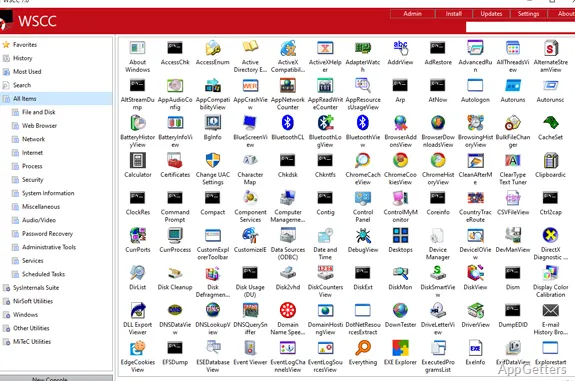
Need one place to find and keep track of Windows troubleshooting utilities? WSCC brings tools from suites such as Sysinternals and NirSoft into a central catalog, where you can organize, update, and launch them.
Browse and launch utility suites
WSCC, short for Windows System Control Center, is a manager for utilities from several system-tool collections. Its catalog brings together supported tools from the Sysinternals Suite and NirSoft Utilities, with more suites also supported. Browse the entries and start a utility from WSCC instead of keeping track of each tool's location yourself.
WSCC organizes the collection and provides a central place to open its utilities; the individual tools still perform their own tasks.
Install or update tools through WSCC
WSCC can fetch supported utilities and manage their updates. You can let it install and update tools automatically, or use its download-and-run method to retrieve programs over HTTP. Downloads come from the utilities' own authors' websites.
Internet access is needed for online downloads and updates, but is optional when using tools already available locally.
Carry the portable edition on a USB drive
The portable edition runs without being installed and can be stored on a USB drive. That setup lets a technician carry WSCC and its utility collection between computers, with the tools accessible from the same portable location.
Pros
- Organizes and launches Sysinternals and NirSoft utilities from one catalog
- Can download and update supported tools automatically
- Portable edition can run from a USB drive
System requirements: Windows 7, Windows 10, Windows 11 · Internet access is optional for app installations and updates
Which utility collections does WSCC support?
It supports the Sysinternals Suite, NirSoft Utilities, and other utility collections.
Can WSCC download and update utilities?
Yes. It can install and update supported utilities automatically, or download and run programs over HTTP.
Can WSCC run from a USB drive?
Yes. The portable edition does not require installation and starts straight from a USB stick.