EXE
Home » Software » Windows » Tools » PosteRazor for Windows
PosteRazor for Windows

PosteRazor for Windows

Producing huge posters in printing at home or in small office environments is often more challenging than people believe. A majority of standard printers are only capable of printing normal paper sizes. This creates an issue when people want to make banners, classroom displays, event signs, or simply big pieces of art without having to pay for professional printing. Most of the time, people try to manually split large images over several pages. This not only wastes time but also hardly ensures evenly matching results. PosteRazor is made to really make things easy in this scenario. It isn’t a graphic editor at all, but it mainly deals with breaking a huge-sized image into parts that are easy to print and then assemble to make full-size posters.

When you use the program, it is more like a specialized printer helper that requests you to have the printer split the image into pieces. This allows you to print them one by one and then glue them together into a whole poster, rather than a new design application.

Making Standard Printers Capable of Creating Large Posters

Getting rid of high-priced large-format printing services is one of the main factors in why users have PosteRazor on their computers. The program slices an image only once into different pages without disturbing the printing alignment and size uniformity. After printing, the user manually joins the papers into one big image.

In Windows day-to-day usage, this software can be very helpful in the field of education, ideas for decorating the living room, making presentations, or even event preparation. Apart from that, this program is very handy for decorating classroom walls by teachers, students who are going to present their projects, and small businesses that want to produce signs that are only for a short period of time.

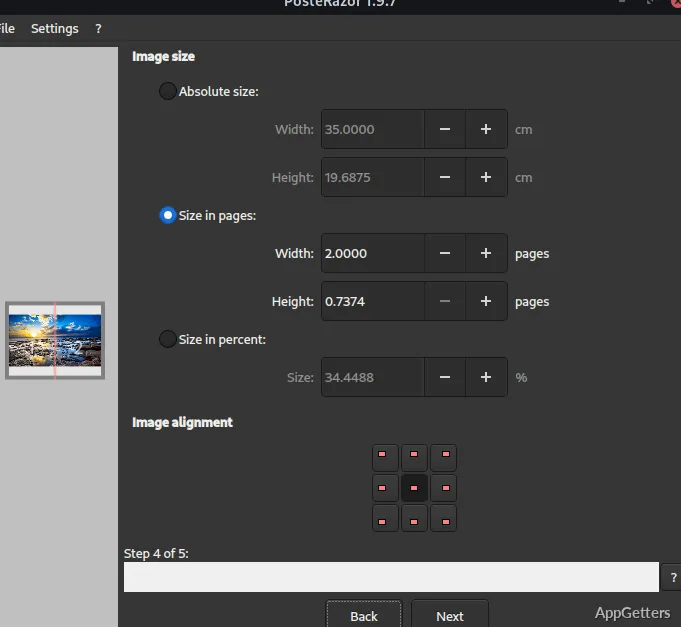
In fact, the operation is not complicated at all. An image is simply loaded, paper size and overlap are chosen together with some other settings, and that’s it, the software is waiting for you to finalize how the poster is going to be split up. Thanks to this logic, even those who are new to computers can do something that, without these tools, would have needed Adobe Photoshop or similar.

On the other hand, this level of simplicity suggests that the program is kept in a narrow focus. PosteRazor does not have advanced editing or layout designing beyond poster splitting.

Easy Steps and Effective Printing

Compared to other ways, mainly on Windows, PosteRazor is not at all demanding of hardware. Even ancient PCs can deal with it because the program is very lightweight and single-purpose. The interface leads the user to the next step in poster making most of the time. It does not try to show people lots of big menus or professional print terminologies that might scare them away.

For instance, if you are in the stage of setting up your Photoshop project, with step-by-step guiding material by your side, you have the opportunity to pick the right steps and not get it wrong. Similarly, users can estimate the number of pages required, determine the printing layout of the assembled image, and make changes accordingly, all before the printing starts. This small yet powerful feature is very convenient, especially if you are running low on paper or have ink that could be more effectively used with the help of a quick print preview.

Also, the overlap options in a printed page go a long way in the alignment of two adjacent pages. After printing, permitting a more accurate result. For quilters, party planners, and other people who sometimes work in big groups, this feature will be one of the strongest arguments of the whole program because aligning each page manually is one. Of the most annoying parts of a home poster creation project.

Certainly Not a Full-Scale Publishing Software

PosteRazor reliably fulfills its main function, but because of its specialization, it can only do the bare minimum. Anyone who wants advanced publishing tools, creative template galleries, or professional print design features will find the program quite deficient. It is not suitable for complicated production work.

The focus of these programs is on image splitting and scaling. To the extent that even visual editing is almost a completely forgotten feature. Additional software is required if a user wishes to introduce text, change colors, or come up with completely redesigned layouts prior to poster generation.

Besides that, physically assembling printed pages still needs the user’s effort. Big posters, once printed, require cutting, trimming, and careful taping of sheets. This can be a time-consuming task when the project is large. The software eases the preparation, but it does not take away the manual assembly process.

Great Neighborly Utility for Schools, Events, and Home Printing

PosteRazor is really aimed at the people who are rarely in need of large-format printing. And who don’t want to invest in expensive printing equipment or professional publishing software. In the Windows environment, it complements the standard printer. By allowing this printer to easily handle large images. In a way that is really manageable.

Educators who make classroom displays, pupils who do exposé material, hobbyists who produce decorative sign posters, and small establishments. They print only temporary signage and are the target user groups. Who would definitely profit from the workflow this software offers. The reason why it has been so successful is that one keeps on doing one thing and doing it well. And without requiring heavy setting changes.

At no time was it designed to be a sophisticated graphic design or commercial publishing application. Still, PosteRazor has a simple and cheap solution for most poster printing cases that do not require professional production depth.

Software Details of PosteRazor 1.5.2

License
Free
Version
1.5.2
File Size
814.35 KB
Downloads
0
Languages
English English, Afrikaans, Amharic, Arabic, Armenian, Belarusian, Bulgarian, Catalan, Chinese, Croatian, Czech, Danish, Dutch, Estonian, Farsi, Finnish, French, German, Greek, Hebrew, Hindi, Hungarian, Icelandic, Indonesian, Italian, Japanese, Kazakh, Korean, Latvian, Lithuanian, Malay, Norwegian, Polish, Portuguese, Romanian, Russian, Serbian, Slovak, Slovenian, Spanish, Swahili, Swedish, Tagalog, Thai, Turkish, Ukrainian, Vietnamese, Zulu
Category
Op. System
Windows
Developer
Last Updated
August 25, 2023

Version History

1 version
1.5.2
Latest
814.35 KB
August 25, 2023

Leave a Comment

Your email address will not be published. Required fields are marked *

Software Icon
Security Report

Loading scan data...

Scroll to Top