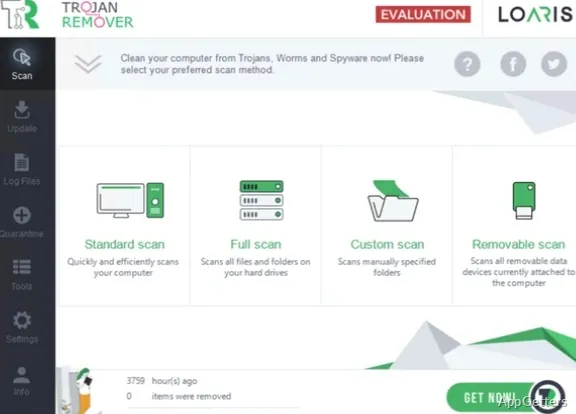
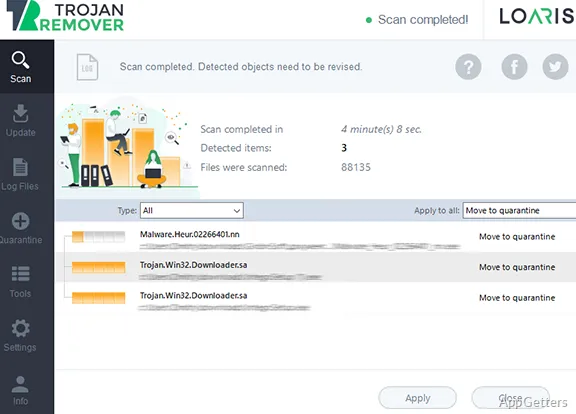
The results view shows detected items alongside their classifications and selected handling actions. Loaris Trojan Remover lets you run an on-demand scan, inspect findings, and choose how to handle suspicious files.
Choose the scan that fits the check
Loaris Trojan Remover offers standard, full, and custom scans, plus an option for removable media. A custom scan can focus on a selected path, while a removable-media scan checks an attached drive. These choices let you direct the scan toward a particular concern or examine a broader set of locations.
The scan checks Windows files and installed items, startup entries, and browser-related changes. Browser checks can bring attention to unfamiliar installers, extensions, redirects, and bundled applications that appeared unexpectedly.
Inspect findings before cleanup
The results view presents each detected item with its location, classification, and selected action. Review those details to understand what was found and how the program is set to handle it.
- Quarantine suspicious files to isolate them.
- Ignore known files that should not be handled as threats.
- Use scan logs to retain a record of results.
Focus on suspicious PC behavior
Run a scan when pop-ups, browser redirects, unexpected extensions, or unfamiliar software appear. The findings can include trojans, worms, adware, spyware, and potentially unwanted applications. Scanning and reviewing findings are available without charge; cleanup requires a trial key or a paid license after the trial.
Pros
- Standard, full, custom, and removable-media scan options
- Results show item location, classification, and handling action
- Quarantine suspicious files and keep scan logs
- Ignore files identified as known items
Cons
- Full cleanup after the trial requires a paid license
System requirements: Windows 7, Windows 8, Windows 8.1, Windows 10, Windows 11
Can Loaris Trojan Remover scan a specific folder or drive?
Yes. Choose a custom scan for a selected path, or scan attached removable media.
What information does the results view show?
It shows the detected item, its location and classification, and the selected handling action.
Can suspicious files be isolated before removal?
Yes. Quarantine isolates suspicious files, and scan logs keep a record of results.