Email attachment too big or a drive filling up? Kingshiper File Compressor shrinks video, image, audio, GIF, PDF, Word, PowerPoint and Excel files. Its separate compression tools support batch processing, and files are handled on the local device.
Eight file-specific compressors
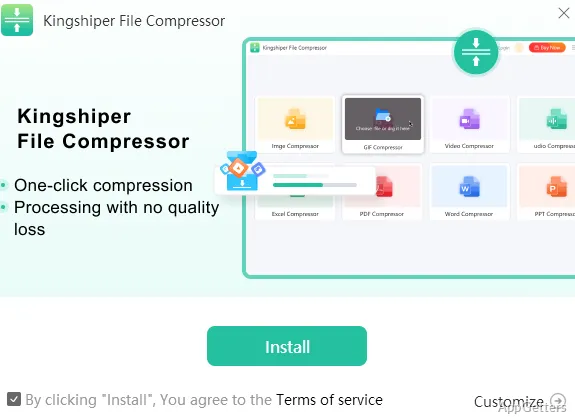
The app separates compression into tools for video, GIF, audio, images, PDFs, Word documents, PowerPoint presentations, and Excel spreadsheets. Choose the tool that matches the file type, then process multiple files in a batch.
Supported examples include MP4, AVI, FLV, MOV, and MKV video; JPG, PNG, and BMP images; and DOC or DOCX Word files. PowerPoint support covers PPT and PPTX, while Excel support covers XLS and XLSX.
Media and document batches
The video tool targets smaller files while retaining reasonable picture quality. The image and audio tools also offer batch compression, with the stated aim of limiting visible or audible loss. GIF compression is intended to retain both the animation and its quality.
For documents, the PDF tool reduces file size while retaining the page content and layout. The Word, PowerPoint, and Excel tools process their respective document types in batches to make files smaller for storage or sharing.
- Audio formats include MP3, WAV, OGG, FLAC, M4A, WMA, and others.
- Office formats include DOC, DOCX, PPT, PPTX, XLS, and XLSX.
Local file processing
Compression takes place on the device, so files do not need to be uploaded to an external server for processing.
Pros
- Batch compression is available for all eight file categories
- Video support includes MP4, AVI, FLV, MOV, and MKV
- Image support includes JPG, PNG, and BMP
- Processes files locally without uploading them to external servers
System requirements: Windows 7, Windows 8, Windows 8.1, Windows 10, Windows 11
Which file types can Kingshiper File Compressor process?
It has tools for video, GIF, audio, images, PDFs, Word documents, PowerPoint presentations, and Excel spreadsheets. Supported examples include MP4, JPG, MP3, DOCX, PPTX, and XLSX.
Can it compress multiple files at once?
Yes. Its video, image, audio, GIF, PDF, Word, PowerPoint, and Excel tools support batch compression.
Are files uploaded to a server for compression?
No. The app processes files on the local device without uploading them to external servers.