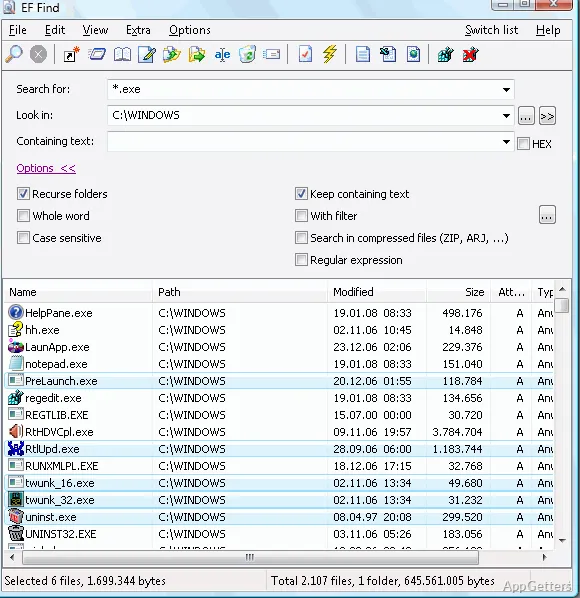
The search window pairs file and content searches with a list of matching results. EF Find can look across drives and folders, search for text, hexadecimal sequences, or regular expressions, and examine supported compressed archives.
Searching inside archives
EF Find can search within archive contents, so files do not have to be extracted just to check what they contain. Supported formats include ZIP, 7-Zip, RAR, CAB, ISO, TAR, GZIP, and WIM, among others. This covers common compressed files as well as disk-image and package formats.
To include compressed files in a search, enable the “Search in compressed files” option. Archive support includes formats such as TAR.GZ, TAR.XZ, Zip64, and SFX, alongside standard TAR and ZIP files.
What can a search match?
Search for files across drives and folders, or look for content inside files. EF Find supports ordinary text searches as well as hexadecimal sequences and regular expressions, giving you different ways to locate a known phrase, byte pattern, or text pattern.
- Find files by name or locate matching text within their contents.
- Use a hexadecimal sequence when the content is better identified by bytes.
- Apply a regular expression to search for text patterns.
Adding packer plugins
WCX packer plugins extend the archive formats EF Find can search. Add a plugin through Options > Configuration, then open the Packer Plugins page and add its entry. Afterward, use the compressed-file search option to include the plugin’s format. These modules are made by third parties, so their behavior and support may vary.
Pros
- Searches text, hexadecimal sequences, and regular expressions
- Looks inside a wide range of archive formats
- WCX plugins can add support for other pack formats
Cons
- Additional pack formats depend on third-party WCX plugins
System requirements: 32-bit and 64-bit
Can EF Find search inside ZIP and RAR files?
Yes. ZIP and RAR are among the supported archive formats. Enable “Search in compressed files” to include archive contents.
Does EF Find search for patterns as well as words?
Yes. It can search for text, hexadecimal sequences, and regular expressions.
How can additional archive formats be added?
Add a WCX packer plugin through Options > Configuration > Packer Plugins. Third-party plugins can extend the formats available for compressed-file searches.