EXE
Home » Maintenance » BurnInTest for Windows
BurnInTest for Windows

BurnInTest for Windows

  • By PassMark
  • Free
  • Version: 11.0.1024.15297
  • 177.06 MB
  • Security Report:

Although Windows PCs attempt to run continuously even when they are heavily used, the stability of the hardware is still very frequently ignored. Problems such as crashing randomly, getting too hot, or parts breaking down may not be visible all the time while the computer is being used normally. Typically, such problems are made known only by very heavy, uninterrupted use, which can be quite a hassle. So, in a sense, this is what makes BurnInTest and other similar programs for testing necessary. Rather than taking wild chances, it allows a user to test the strength of the computer components one at a time. It also allows them to see how they perform when overloaded, in order to have a clear understanding of the system’s overall condition.

Creating a Real Stress Environment on Ordinary Hardware

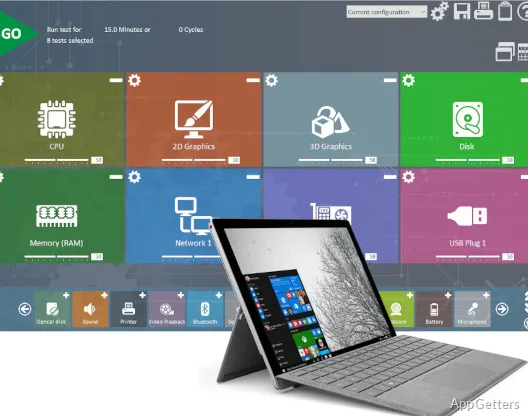
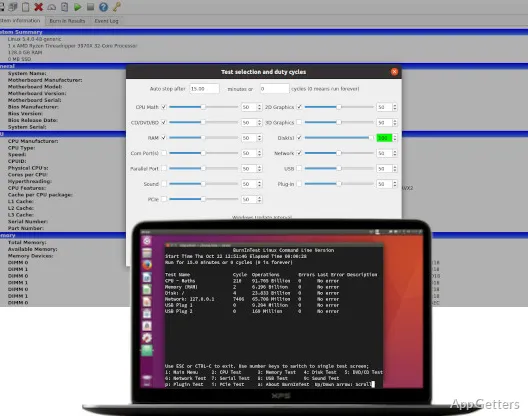
BurnInTest will be continuously loading the underperforming hardware parts using forceful operations. The processor, graphics card, memory, hard drives, and even network ports could be tested either one at a time or all together. This would be more of a real-life scenario than just plain benchmarking to me.

The tool performs a constant loop of stress operations like making animations, using the disk heavily, and finally making statements about the memory use. For this reason, it is a great tool to monitor the first warning signs of a malfunctioning system. Normally, people would see their computers working fine after a short session. However, it is only after a good, thorough going through a stress phase that the temperature-related and the hardware stability problems will be exposed.

Looking at Stability Deeper Than Just Performance Levels

BurnInTest distinguishes itself from other testing tools in that it keeps an eye on the components continuously. It reports even while they are performing, rather than giving a final score only. It also records the errors and spikes in heating very thoroughly.

This makes it highly valuable for a user who is trying to solve crashes or freezing of the system without the help of any error messages. If a stress test is run for a long chain of operations, then the user will be able to detect the root cause of the problem. It may be a failing memory module, an overheating, or a malfunctioning device. The guides are quite simple for newcomers to understand. At the same time, they are detailed enough for experts who want to investigate the root cause.

Practical Use Cases for Different Users

BurnInTest easily integrates with real-life usage scenarios. For a PC user, it can be a post-build or post-upgrade check. It helps to verify that all parts are working correctly prior to the introduction of the system to everyday usage. For school or casual users, it can be a very handy tool in the case of unexplained slowdowns or stability issues.

Very busy environments, like small offices or repair workshops, would see this product turning into an instrument of verification. The IT guys may stress-test systems before deployment or after performing a service. This helps check that the systems are in good working order. The feature of going hands-free for the whole period of testing, supported by a good scheduling interface, will certainly help. This is especially useful when multiple machines are involved.

Where It Fits in a Windows Maintenance Routine

BurnInTest should be considered one element of the total system reliability strategy. It is not simply a one-step solution on its own. The software cannot repair problems, but it exposes issues only. Driver updating and monitoring may also be used along with it, giving the best results.

If you plan on doing continuous stress tests for a long duration, your system would generate high temperatures. It may also produce significant noise. This is especially true when you consider laptops and compact/pose systems. So, make sure the system is well aerated at all times. If running, it should be when the conditions are conducive. Besides that, analyzing test results might be a bit tricky unless you have quite a bit of knowledge about hardware. Even though the program runs most of the time, the interface is very user-friendly.

Best Suited for Stability Checks and Pre-Deployment Testing

BurnInTest really makes the most of its features when issues like confidence and dependability matter more than achieving the highest scores in performance testing. This software is a great solution for users who want to be absolutely sure that their machines can run nonstop 24 hours a day. It helps ensure stability without crashing. Whether it is a freshly configured PC, a fixed or refurbished one, or hardware that will soon be regularly used, stability can be demonstrated.

It may thus appear to the ordinary user as an occasional luxury rather than a must-have. For the extended reliability freak, this will be an extremely useful instrument. Its main function is not to increase the speed but only to confirm that under pressure, the speed remains constant. This is usually the more significant factor in actual usage.

Software Details of BurnInTest 11.0.1024.15297

License
Free
Version
11.0.1024.15297
File Size
177.06 MB
Downloads
0
Language
English
Category
Op. System
Windows
Developer
Last Updated
April 16, 2026

Version History

5 versions
11.0.1024.15297
Latest
177.06 MB
April 16, 2026
11.0.1023.15215
176.94 MB
April 8, 2026
11.0.1022.14547
177.19 MB
April 6, 2026
11.0.1021.14546
176.9 MB
February 6, 2026
11.0.1020.14358
176.94 MB
January 27, 2026

Leave a Comment

Your email address will not be published. Required fields are marked *

Software Icon
Security Report

Loading scan data...

Scroll to Top