It is a common situation that Windows Bluetooth users are only aware of their need for newer versions of Bluetooth after things stop working right. This includes situations when wireless earbuds suddenly disconnect, a game controller lags, or a newer device refuses to pair at all. Unless, of course, the problem is a bit concealed. Windows itself doesn’t clearly indicate what Bluetooth version is being used by the adapter in most cases.
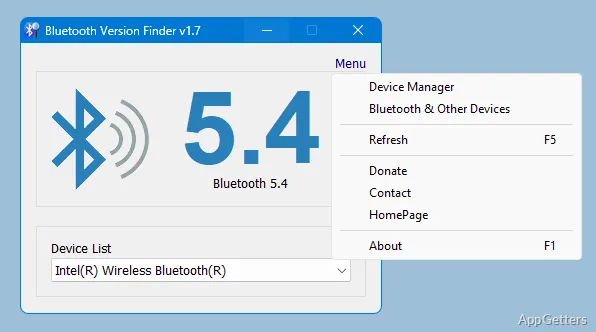
Bluetooth Version Finder, a tiny Windows utility, is at the same time a handy little program. It does the difficult task of showing your actual Bluetooth version in a much simpler fashion. The software that is a tool can be used by those who are experiencing problems with compatibility. It can also be used for hardware checking prior to the purchase of accessories.
Finding Bluetooth Hardware Made Simpler
In fact, in most cases, it can be very difficult to figure out the Bluetooth specs on a Windows system. It is more likely that the device names relate very little to the hardware. This is especially true if laptops running customized drivers by manufacturers are concerned. Bluetooth Version Finder, on the other hand, can be considered as a shortcut. Rather than going through the entire process, it will just perform a scan. It will also tell you the detected Bluetooth version straight away.
In fact, it is more of a utility rather than what we usually understand as a full-fledged application. Basically, it comes up right away, focuses on a single task, and skips introduction menus or background services altogether. And that is why it is simple enough for a person who is not familiar with going through hardware IDs or chipset details.
Checking that Bluetooth Version Finder can give you the major version of Bluetooth your current device is using can also be a step toward comprehending compatibility. It helps determine if your computer can take advantage of all the features that recent Bluetooth standards emphasize in providing. For example, stabilized audio, lower power consumption, or extended wireless range strength.
Good for Compatibility Tests and Problem Resolution
Most of the Bluetooth issues on Windows result from using outdated adapters rather than defective peripherals. For instance, even though a headset with a Bluetooth 5.0 feature will continue to work with an old adapter, users might find performance degraded and support of features reduced. Bluetooth Version Finder can be quite helpful in such cases by delivering a clear understanding. This happens before users do any unnecessary things like driver reinstallations or device replacements.
Briefly, teachers, students, home users, and people working from home are the ones who will get the most out of this quick verification utility. It will confirm that an old laptop is the bottleneck for wireless accessories in various situations. These include calls, online classes, or gaming.
Similarly, it is a quick and painless diagnostic step before hardware upgrades. Problems will be less if one can confirm the active Bluetooth generation on the machine itself. This is more reliable compared to relying on a marketing page of the manufacturer.
Small Size and Big Impact
Apart from its narrow focus, the biggest strength of this software is that it maintains that focus. It does not even dream of doing Bluetooth device management, driver installation, and connection optimization. Users who want wireless management tools all-in-one will probably be disappointed. But on the other hand, this software can be acknowledged as clear, straightforward, and trustworthy.
The user interface is so simple that one may not even expect to need a manual. Understanding the outcome is the first thing people normally do immediately after launching the app. Since the only concern of the software is the identification of the hardware, it also does not draw enough of the system’s resources to be noticed.
Nevertheless, the software, at the end of the day, remains somewhat limited for users. If they infrequently connect wireless devices, they may not find much use for it. But the more they are involved in troubleshooting, the more its value will be felt.
In What Situations Is Bluetooth Version Finder a Good Choice?
Using Bluetooth Version Finder is mostly about practical assistance whenever you get stuck and do not want to waste a lot of time figuring out Bluetooth compatibility. It is not about changing your way of life.
Specifically, the software applies to older laptops with Windows, refurbished PCs, and custom-built desktops. A piece of hardware info is most likely to be unclear or even missing completely there. It offers a quick lookup capability so that the user can decide what wireless headphones, keyboards, controllers, or adapters to buy.
Anybody running a handful of systems at the same time will find the minimalist approach very convenient. Besides quickly doing its job, the software also presents comprehensible information. It lets the user continue with other activities free of unnecessary interference.