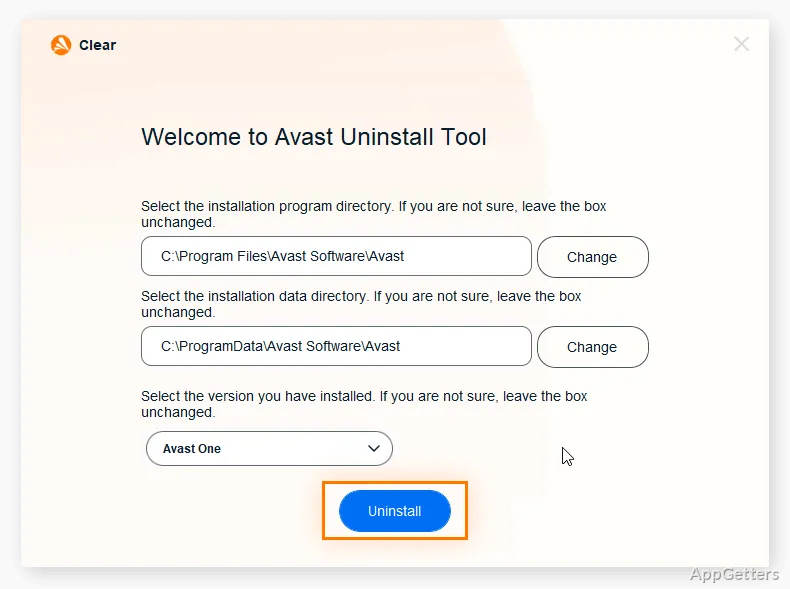
The removal window lets you choose an Avast product and its installation folder, with both usually detected automatically. Avast Clear is AVAST’s dedicated utility for removing Avast Antivirus products when the regular uninstall process fails.
Choosing the Avast installation
Avast Clear presents the installed Avast product and its program folder for removal. It usually fills in both selections automatically; if needed, you can choose the folder containing the program files and select the product yourself.
The utility supports removal of Avast One, Avast Premium Security, and Avast Free Antivirus. After confirming the selection, choose Uninstall to begin removing the selected product.
When should you use Avast Clear?
Use Avast Clear when Windows’ normal uninstall route fails to remove an Avast product. Its separate removal window can bypass the standard Avast uninstaller setup, including situations where an active setup process prevents a regular uninstall.
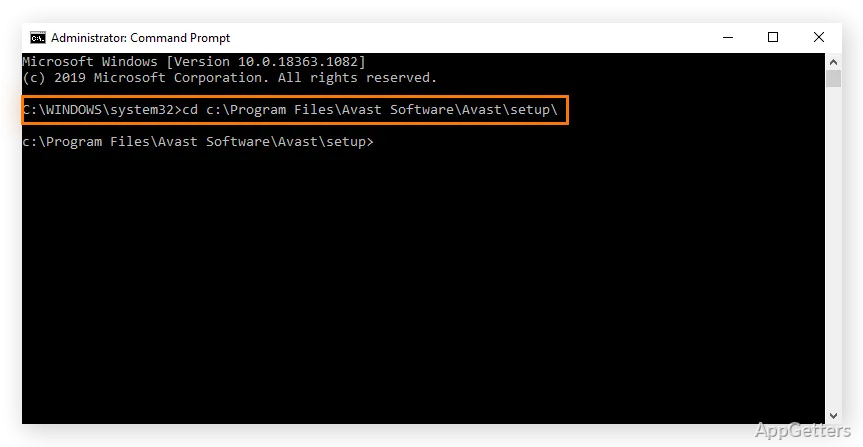
The tool focuses on uninstalling Avast Antivirus products. If its removal attempt does not work, Avast also documents a Command Prompt method as another option.
Safe Mode removal
Avast Clear can prompt you to restart the PC in Safe Mode before removal. Once the computer is ready, confirm the Avast product and installation folder, then start the uninstall. Restart the computer after the removal finishes.
Pros
- Automatically detects the Avast product and its installation folder in typical cases
- Can remove Avast when the regular uninstaller is blocked by an active setup process
- Supports removal of Avast One, Avast Premium Security, and Avast Free Antivirus
Cons
- The removal process requires restarting the computer
System requirements: Windows 7, Windows 8, Windows 8.1, Windows 10, Windows 11 · 32-bit and 64-bit
Which Avast products can Avast Clear remove?
It can uninstall Avast One, Avast Premium Security, and Avast Free Antivirus.
Does Avast Clear use Safe Mode?
It can prompt you to restart the PC in Safe Mode before removing the selected Avast product.
Do I need to restart after removal?
Yes. Restart the computer after Avast Clear completes the uninstall.