New antivirus refuses to install because an old one left pieces behind? The free Antivirus Removal Tool finds current antivirus installs and traces of earlier ones, and provides routes to Windows uninstall options and manufacturer removal utilities.
Current and past antivirus findings
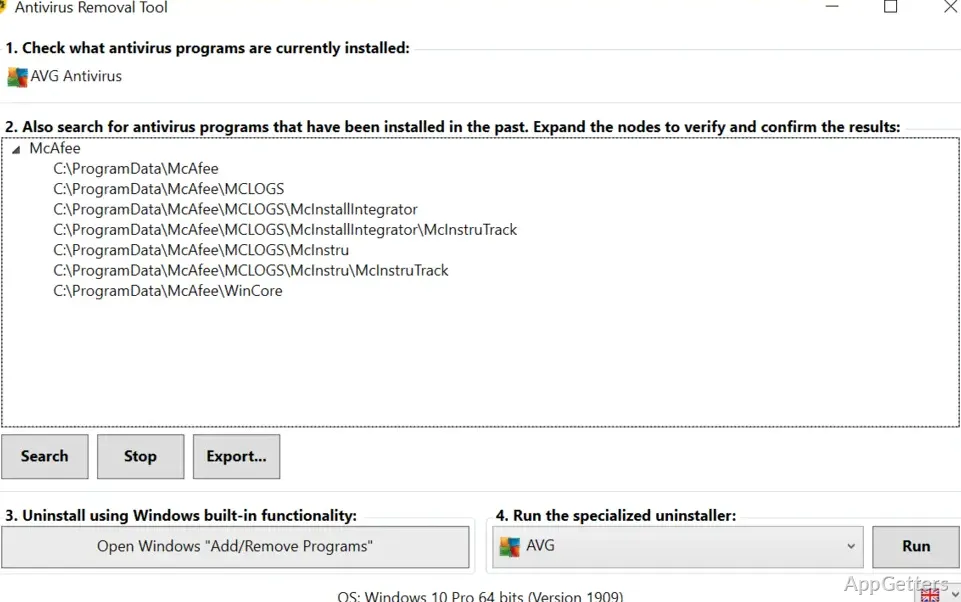
The program identifies antivirus software that is currently installed and searches for leftover folders from some products installed in the past. Results are arranged in tree views under the product or manufacturer name, making it easier to distinguish which software each finding relates to.
Right-click a listed folder path to open it in File Explorer and inspect its contents. A report can also record the computer's serial number, Windows version, and current and previous antivirus installations.
Uninstall options
Antivirus Removal Tool includes a shortcut to Windows Add or Remove Programs. When the standard uninstaller is available, the program recommends starting there.
- Choose from manufacturer-specific removal utilities for 28 antivirus programs in a selector, then launch the selected utility with a button.
- Those utilities are designed by antivirus makers to remove associated files, drivers, services, and registry entries left behind by their products.
Using the findings
For a failed uninstall, lingering antivirus errors, or a conflict between installed security products, first identify the current and past installations shown in the results. Use the Windows uninstall shortcut when appropriate, then select a matching manufacturer utility if more complete removal is needed.
The folder search can surface traces from older products, which may matter when a new antivirus installation is blocked by remnants of software no longer in use. Findings should be matched to the relevant product before opening or removing files.
Pros
- Groups detected products and leftover folders in tree views
- Opens detected paths in File Explorer from the results
- Provides manufacturer removal utilities for supported antivirus products
System requirements: Windows 7, Windows 8, Windows 8.1, Windows 10, Windows 11
Does Antivirus Removal Tool remove antivirus software by itself?
It identifies current installations and past-installation traces, then provides access to Windows uninstall options and manufacturer-specific removal utilities.
How can I inspect a detected leftover folder?
Right-click its path in the tree view to open the location in File Explorer.
What information does its report contain?
The report can include the computer's serial number, Windows version, and current and past antivirus installations.