In today’s age, it has become quite common to open, edit, and share documents at different locations, on different devices, and using different formats. But continuing the procedure fluently is still something a lot of users do not like. Documents lose their layout, and certain elements get broken due to incompatibility. Working together frequently necessitates using different applications or switching cloud accounts. For those Windows users who want a comfortable, consistent, all-in-one workspace without having to change from one tool to another, these little annoyances become a way of their work. ONLYOFFICE is indeed a strong competitor for this problem. Its primary goal is to keep document management user-friendly. It also supports the widely used file formats like DOCX, XLSX, and PPTX.
Very Similar With Slight Differences
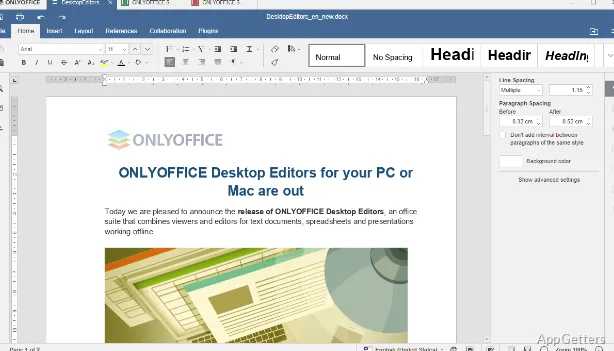
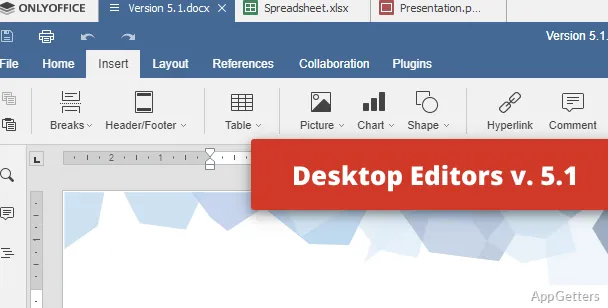
On Windows, ONLYOFFICE has kept the same ribbon layout as many other major office suites. This alone can increase efficiency at work because there will be nothing new to learn. Only getting familiar is required. This is especially true for students or office employees. Also, file launching is done in no time. The interface changes only a little when files are imported from other programs.
This, in reality, would mean there will be fewer new unforeseen problems. Very often, format preservation is successfully performed, especially for documents with mixed contents like tables, pictures, or different styles. The software avoids the bigger layout changes that the light, less compatible rivals present. However, it can fail to completely match in corner cases. For basic editing, note-taking, and document reviewing purposes, the software even gives quite a good feeling of being in control and stable.
Collaborating Within ONLYOFFICE
The best part of ONLYOFFICE for users comes from the fact that it allows collaborating without having to leave the software environment. Co-editing, instead of a side feature, becomes an integral part of every stage of the work process. Signing up with document sharing, following up on changes, and working with others simultaneously are just some of the ways that team collaboration gets eased.
This, essentially, means the dependence on external tools or services will get below a very low level. The UI still makes available comments, version history, and editing modes. These limit the user’s context switching. On the other hand, the full collaborative experience requires connecting to a suitable cloud or server. This may be a bit on the complex side. From the viewpoint of an average user, the whole thing might be seen as more up-to-date compared to simple cloud suites.
Good Enough But Not Perfect
On Windows, the program performs pretty well and offers good and smooth running most of the time, even on average or mid-performance computers. Opening documents is instantaneous, and page turning or scrolling, etc., is problem-free, even in large files. It is not unusual for office suites to be quite heavy when it comes to system resources. But ONLYOFFICE is definitely one of the light ones. This can be seen especially during multitasking.
This is why it is considered not to be a featherweight at all. Actually, even though the team managed to minimize unnecessary feature addition, the program is a full-fledged office suite. At times, when dealing with really large files or presentations having lots of graphics or videos, the application is not very responsive. But it is not at the level to cause such problems. These would end up ruining the user experience.
The safety of a user mainly comes from the reliable operation of the program. All the common scenarios are covered, and users have only rarely reported crashes; autosave keeps one’s hand in work securely without data loss. For those who appreciate stability more than the latest feature innovations, the software has at least one more selling point than new functionalities.
Where ONLYOFFICE Fits Best
ONLYOFFICE is a great choice for those who want a hearty and well-integrated office suite with many features but without any cloud-first character. The users who will get there from change to usual users are primarily students, freelancers, and small teams. Most of all, those group members who almost always work with Microsoft Office files but do not want to pay or simply want a different software solution will be welcomed here.
The app is totally out of question for those hobbyists who have committed themselves to using just one of the proprietary ecosystems. These also offer the most advanced integrations and specialized features. Whereas, with simple document editing and joint work, it provides compatibility among several operating systems. There is hardly a better alternative to ONLYOFFICE.
Works Well for Daily Use
Neither too simple nor too complex, ONLYOFFICE is a really good choice among office suites on Windows. It can serve basic office needs, along with some of the medium-sized features. Compatibility, collaboration, and a user interface that is familiar are the main focuses of the software. This makes it the right tool for overseeing multiple document-related tasks at the same time.
If a person is more interested in using a stable, good-performing product rather than an over-featured one, he/she will have a productivity software available. Although it comes with minimal decorations, it is able to do the job very effectively. It does this without causing the user any stress.