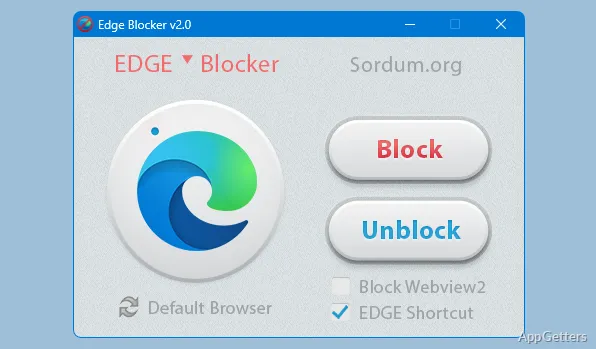
When a Windows link or app launches Microsoft Edge unexpectedly, Edge Blocker gives you a direct way to stop the browser from opening. Sordum’s small utility has Block and Unblock controls, plus a status indicator that shows whether Edge is blocked.
Blocking Edge and checking its status
Choose Block to prevent Microsoft Edge from launching; choose Unblock to restore access. The Edge icon in the program window turns gray when the browser is blocked, providing a visible status cue. With administrator privileges, the restriction applies at the system level and affects all user accounts.
If Edge is open when you activate the block, the utility closes it. The change targets access to Edge, so links or applications that attempt to start the browser will not be able to open it while the block is active.
What can the command-line options control?
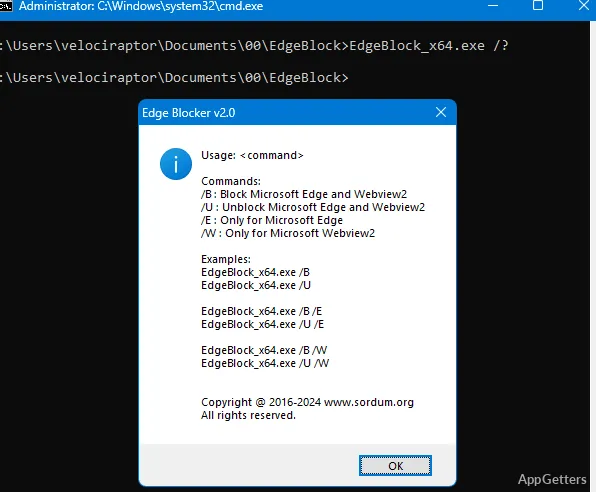
Edge Blocker includes command-line parameters for controlling Microsoft Edge and WebView2 separately. Running either executable with the /? parameter displays the available options.
- Use the Block and Unblock buttons for the browser control.
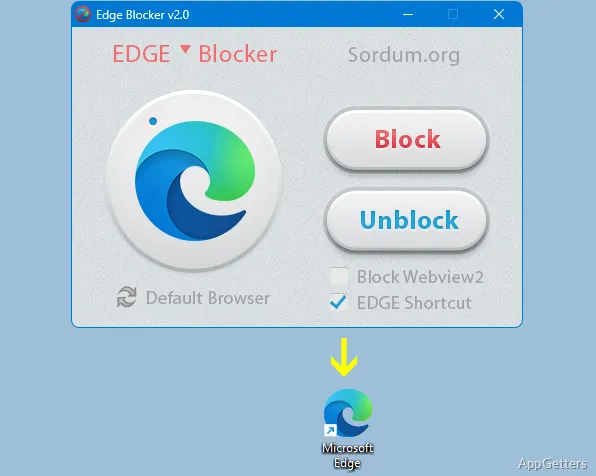
- The Edge shortcut option creates a Microsoft Edge shortcut on the desktop.
- The Edge and WebView2 command-line options can target those components independently.
Could blocking WebView2 affect other software?
Yes. Windows features and other applications may rely on Edge or WebView2 components, so blocking them can interfere with those functions. The WebView2 control is separate from blocking the Edge browser itself.
Pros
- Block and Unblock controls toggle Edge access
- A gray Edge icon indicates that blocking is active
- An optional setting creates an Edge desktop shortcut
- Command-line options can target Edge or WebView2
Cons
- Blocking WebView2 may disrupt Windows components or other apps that use it
- Blocking Edge closes it if it is already open
System requirements: Windows 7, Windows 8, Windows 8.1, Windows 10, Windows 11
How can you tell whether Edge is blocked?
The Edge icon in the program window appears gray when blocking is active.
Does Edge Blocker also control WebView2?
Yes. Its command-line options can target WebView2 separately from Microsoft Edge.
What happens if Edge is open when you block it?
Edge is closed as part of the blocking process.